
Plain text doesn’t always grab attention. On social media, gaming platforms, and messaging apps, stylish text can make your name, bio, or caption stand out instantly.
That’s where a fancy text generator comes in.
A fancy text generator converts normal text into stylish Unicode fonts that you can copy and paste anywhere. In just a few seconds, you can create bold text, cursive letters, aesthetic symbols, or decorative styles for Instagram, Discord, TikTok, Facebook, and more.
These tools don’t require downloads or design skills. You simply type your text, choose a style you like, and copy the result. Because the output uses Unicode characters, it works across most platforms without needing special font files.
However, not all fancy text generator tools offer the same features. Some focus on simple copy-and-paste use. Others provide advanced symbol collections, branding-friendly styles, or extra formatting options.
In this guide, we compare the top 10 best fancy text generator tools online. You’ll learn what each tool offers, who it’s best for, and which one fits your needs.
- What Is a Fancy Text Generator?
- Top 10 Best Fancy Text Generator Tools Online
- 1. CASECONVERTER.TOOLS – Fancy Text Generator
- 2. LINGOJAM – Fancy Text Generator
- 3. FLYERWIZ – Fancy Text Generator
- 4. PICSART – Font Generator (Quicktools)
- 5. NAMECHEAP – Fancy Font Generator
- 6. COOLSYMBOL – Cool Fancy Text Generator
- 7. TEXTTRICK – Fancy Text Generator
- 8. LOREMIPSUM.IO – Font Generator
- 9. CREATIVE FABRICA – Stylish Text Generator
- 10. ORIGINALITY.AI – Fancy Text Generator Guide
- Best Fancy Text Generator Tools by Use Case
- Frequently Asked Questions (FAQs)
What Is a Fancy Text Generator?
A fancy text generator is an online tool that converts plain text into stylish Unicode characters. Instead of changing the actual font, it replaces standard letters with decorative symbols that look like different font styles.
When you use a unicode fancy text generator, your text stays copy-and-paste friendly. That means you can paste it into Instagram bios, Discord usernames, TikTok captions, Facebook posts, and even gaming profiles without installing any fonts.
Most fancy text generator online tools work the same way:
- Type your text into the input box.
- Browse multiple style variations.
- Copy the version you like.
- Paste it wherever you want.
The best fancy text generator tools also include bold text, cursive styles, small caps, symbols, emojis, and decorative characters. Some even offer themed styles for social media, branding, or gaming names.
In short, these tools help you create eye-catching text instantly, no design skills required.
Top 10 Best Fancy Text Generator Tools Online
There are dozens of tools available, but not all offer the same quality, style variety, or ease of use. Some focus on quick copy-and-paste results, while others provide advanced symbol collections, branding-friendly fonts, or extra customization options.
To help you choose the right fancy text generator, we’ve reviewed and shortlisted the most reliable and feature-rich platforms. Each fancy text generator online tool below is easy to use, works across major social media platforms, and supports clean Unicode output.
Here are the top tools we’ll cover:
Top 10 Best Fancy Text Generator Tools Online
- CaseConverter.tools – Fancy Text Generator
- LingoJam – Fancy Text Generator
- FlyerWiz – Fancy Text Generator
- Picsart – Font Generator Tool
- Namecheap – Fancy Font Generator
- CoolSymbol – Cool Fancy Text Generator
- TextTrick – Stylish Text Generator
- LoremIpsum.io – Font Generator
- Creative Fabrica – Stylish Text Generator
- Originality.ai – Fancy Text Generator Guide
Next, we’ll break down each tool individually, including features, pros, limitations, and best use cases.
1. CASECONVERTER.TOOLS – Fancy Text Generator
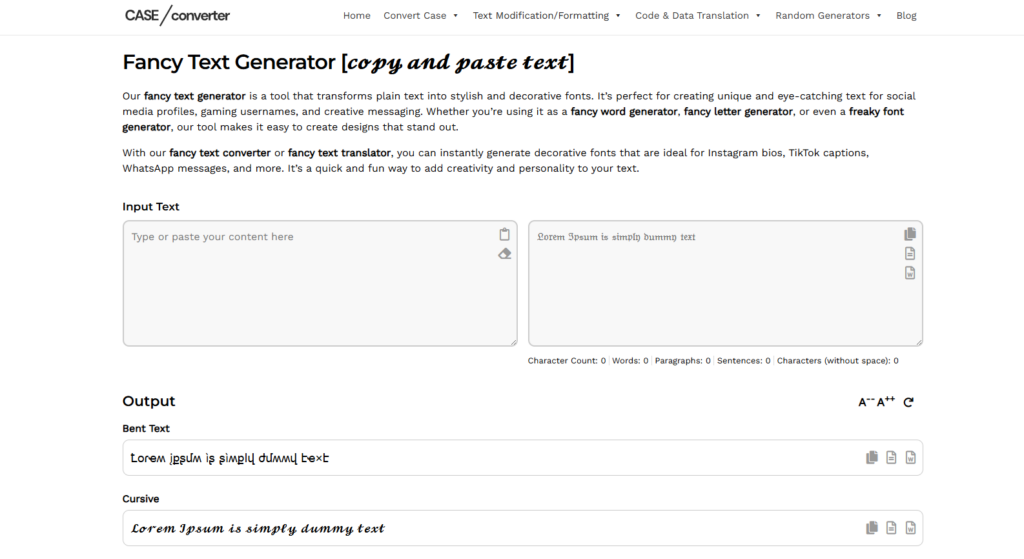
CASECONVERTER.TOOLS offers a clean and efficient fancy text generator built for users who want quick results without distractions. The layout is simple, making it easy to type or paste your text and instantly view multiple stylish variations below the input box.
This fancy text generator online focuses on speed and usability. As soon as you enter text, the tool generates different Unicode styles automatically. Each output includes a one-click copy option, allowing you to paste the styled text directly into Instagram bios, TikTok captions, Discord usernames, Facebook posts, or gaming profiles.
Key Features
-
Real-Time Text Conversion: The tool instantly converts your input into multiple stylish Unicode formats without requiring page reloads or extra clicks.
-
Wide Range of Font Styles: Includes bold, cursive, decorative, bent text, and other creative variations suitable for social media and usernames.
-
One-Click Copy Buttons: Every generated style comes with a copy icon, making it quick to transfer text to any platform.
-
Character & Word Counter: Displays character, word, paragraph, and sentence count, which is useful for social media limits.
-
Mobile-Friendly Interface: The layout adapts well on smartphones and tablets, allowing smooth use across devices.
Pros and Cons
| Pros | Cons |
| Clean and distraction-free interface | Limited advanced customization options |
| Instant Unicode conversion | No style filtering or search feature |
| No registration required | Visual design is basic compared to some competitors |
| Works well on both desktop and mobile | Focuses mainly on standard decorative styles |
Best For
Users who want a free fancy text generator that delivers quick, reliable copy-and-paste Unicode fonts without extra complexity.
2. LINGOJAM – Fancy Text Generator
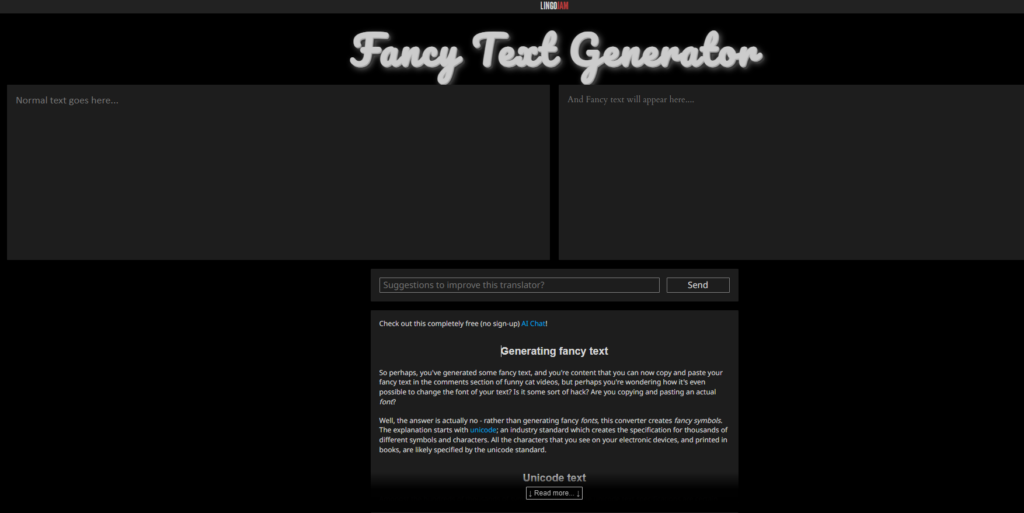
LINGOJAM is one of the most popular and widely used fancy text generator tools online. It offers a simple two-column layout where you type normal text on the left, and multiple styled versions appear automatically on the right.
This fancy text generator online is known for its large collection of Unicode styles. As you type, the tool instantly generates dozens of variations, making it easy to scroll, select, and copy your favorite version. It works well for Instagram bios, Discord usernames, TikTok captions, YouTube comments, and gaming names.
Unlike many basic tools, LINGOJAM also includes a short explanation about how Unicode text works, which helps users understand why the styled text can be copied and pasted across platforms.
Key Features
-
Instant Dual-Panel Conversion: The side-by-side layout shows plain text and styled output at the same time, making comparison simple and fast.
-
Large Collection of Unicode Styles: Offers bold, cursive, glitch, aesthetic, small caps, and decorative symbol variations in one place.
-
Unlimited Text Input: Users can generate long paragraphs, not just short names or bios.
-
Copy-Friendly Output: Each generated style can be easily selected and copied without extra formatting.
-
No Account Required: The tool is completely free to use and does not require signup.
Pros and Cons
| Pros | Cons |
| Very large variety of font styles | Interface looks outdated compared to modern tools |
| Instant automatic generation | No built-in copy button for each style |
| Works across major social media platforms | Ads may appear on the page |
| Free and accessible worldwide | No advanced filtering or style categorization |
Best For
Users who want a free fancy text generator with a wide range of Unicode styles and don’t mind a simple interface in exchange for variety.
3. FLYERWIZ – Fancy Text Generator
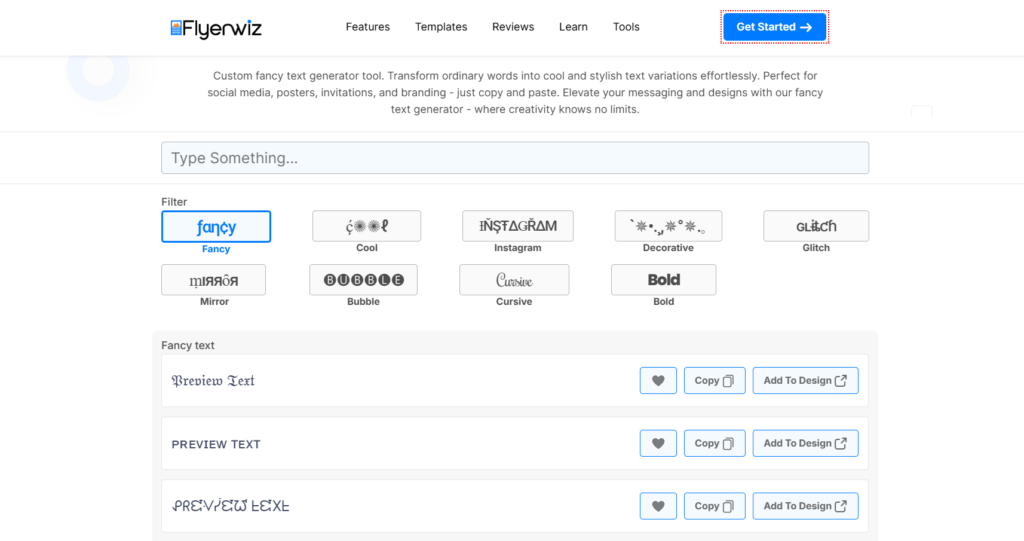
FLYERWIZ offers a modern and visually polished fancy text generator built for users who want both style and control. Unlike basic tools, it includes filter options that allow you to browse specific categories such as Fancy, Cool, Instagram, Decorative, Glitch, Mirror, Bubble, Cursive, and Bold.
This fancy text generator online provides instant text conversion as you type. The interface is clean, and each generated style includes a direct copy button. One standout feature is the “Add to Design” option, which connects the text directly to FLYERWIZ’s design tools, making it useful for social media graphics, posters, and branding materials.
The layout feels more structured and organized compared to simpler generators, making it easier to find specific styles quickly.
Key Features
-
Category-Based Style Filters: Users can filter text styles by themes such as Instagram, Glitch, Bubble, Cursive, or Bold instead of scrolling through a long list.
-
Instant Live Preview: Text updates automatically as you type, allowing quick comparison between different styles.
-
One-Click Copy Button: Each style includes a clear copy option for fast use across platforms.
-
Add to Design Integration: Unique feature that allows users to send styled text directly into FLYERWIZ design templates.
-
Modern User Interface: Clean layout with clearly separated sections and easy navigation.
Pros and Cons
| Pros | Cons |
| Organized style categories | May require account for full design features |
| Clean and modern interface | Fewer total font variations than some competitors |
| Instant copy functionality | Some advanced features tied to the main platform |
| Integrated design option | Slightly more complex than basic generators |
Best For
Users who want a free fancy text generator with organized style filters and built-in design integration for social media posts, branding, and creative projects.
4. PICSART – Font Generator (Quicktools)
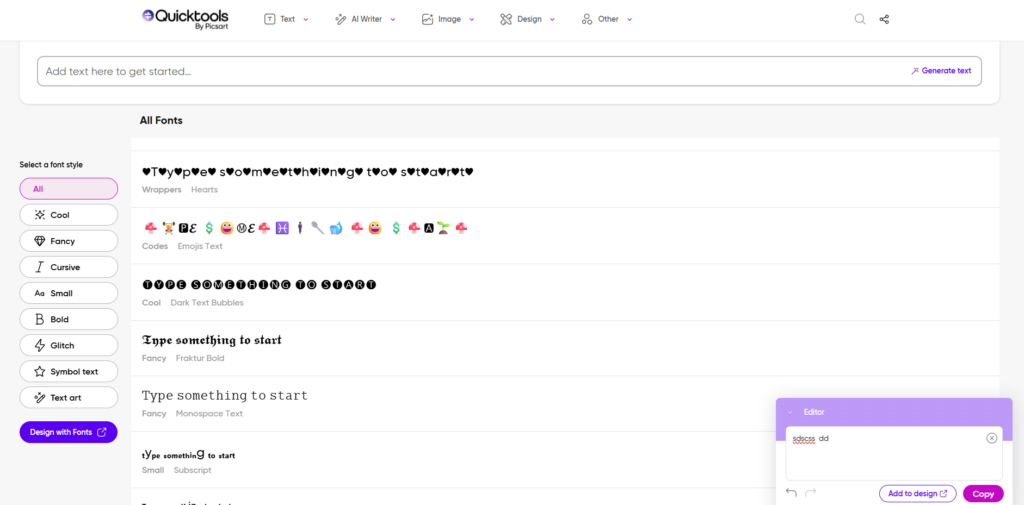
PICSART provides a polished fancy text generator online inside its Quicktools suite. It’s built for users who want a large font library plus an easy way to preview styles before copying. You type your text once, then scroll through many font outputs with clear labels and category filters on the left.
One highlight is the structured filtering system. Instead of scanning a long page, you can switch between categories like Cool, Fancy, Cursive, Small, Bold, Glitch, Symbol Text, and Text Art. This makes PICSART useful when you already know the style you want for an Instagram bio, TikTok caption, Discord name, or profile headline.
It also includes a “Design with Fonts” option, which helps if you want to place your generated text into a visual design workflow, not just copy and paste it.
Key Features
-
Large Font Library With Style Variety: Offers a wide selection of font outputs, including fancy styles, cursive options, bold text, small text, and glitch-style variations, so you can test many looks from one input.
-
Category Filters for Faster Browsing: The left-side menu lets you filter styles by type (Cool, Fancy, Cursive, Bold, Glitch, Symbol Text, Text Art), helping you find the right result without scrolling for long.
-
Live Preview as You Type: Your input updates across the font list, so you can compare different styles instantly and choose the best match for your platform.
-
Copy-Friendly Output for Social Platforms: The tool is built for quick copying, so you can paste results into bios, captions, usernames, and comments across major apps.
-
Design Workflow Option: Includes a “Design with Fonts” feature for users who want to use the text in graphics, posters, thumbnails, or other visual content.
Pros and Cons
| Pros | Cons |
| Clean interface with organized categories | Some features may push users toward the wider PICSART ecosystem |
| Strong font variety and quick previews | Can feel heavier than simple one-page generators |
| Useful filters for specific styles | Copy process may vary depending on device/browser |
| Good option for design-focused users | Not as minimal as basic copy-paste tools |
Best For
Users who want a free fancy text generator with many style categories and a design-friendly interface for social media posts, branding assets, and content creation.
5. NAMECHEAP – Fancy Font Generator
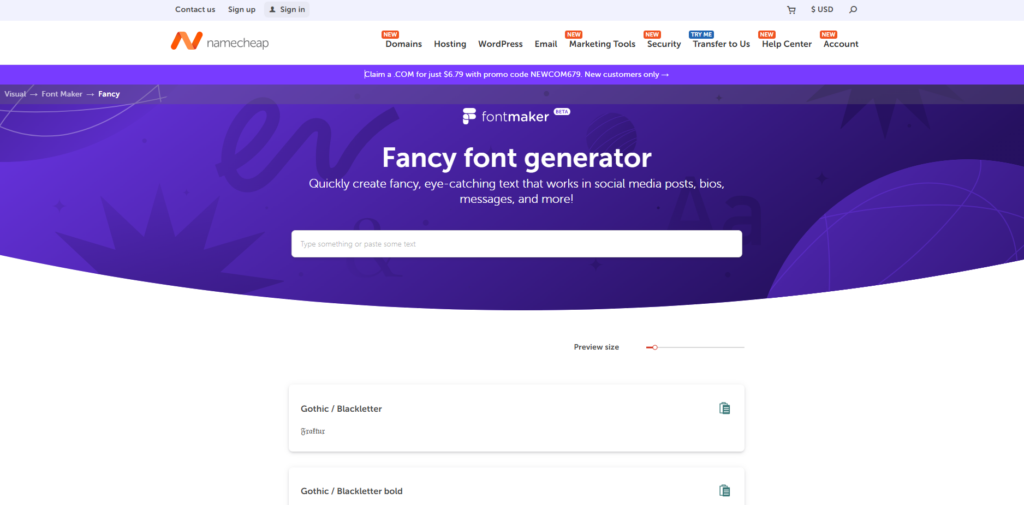
NAMECHEAP offers a clean, structured fancy text generator online that turns regular letters into Unicode “Mathematical Alphanumeric Symbols,” so your text looks like different font styles while staying copy-and-paste friendly. The tool is simple to use: type your text, scroll through style options, then click the copy icon to grab the version you want.
One thing that makes NAMECHEAP stand out is how organized the font list is. Instead of random styles, it provides clearly labeled options such as Gothic/Blackletter, Circled, Monospace, Double Struck (blackboard bold), Script/Cursive, Squared, and multiple serif/sans variations. It also supports font previews as you type, so you can compare styles fast.
Key Features
-
16 clearly labeled fancy font options: The tool includes a focused set of font styles (like Gothic/Blackletter, Circled, Monospace, Double Struck, Script/Cursive, Squared, and serif/sans variants) so users can pick a style without guessing.
-
Unicode-based output that works across platforms: It converts regular text into Unicode characters that keep the same look across most apps and platforms, which helps for bios, captions, usernames, and comments.
-
Live font previews while typing: As you enter text, the tool shows how it looks in each style, making it easier to choose the right option before copying.
-
One-click copy-and-paste icon: Each style includes a copy option that places the selected output on your clipboard so you can paste it instantly.
-
Usage guidance included on the page: The page explains how the tool works and where you can use fancy fonts (social media posts, bios, comments, messages, and more).
Pros and Cons
| Pros | Cons |
| Clean layout with clearly named font styles | Smaller style library than some “100+ styles” generators |
| Live previews make it easy to compare options | Focused more on font variants than decorative symbols |
| Unicode output works in many apps | Some characters may render differently in a few apps (as noted for certain styles) |
| One-click copy makes reuse fast | Not built around social templates like some design-first tools |
Best For
Users who want a free fancy text generator with neatly organized font styles and reliable Unicode output for bios, captions, and profile text.
6. COOLSYMBOL – Cool Fancy Text Generator
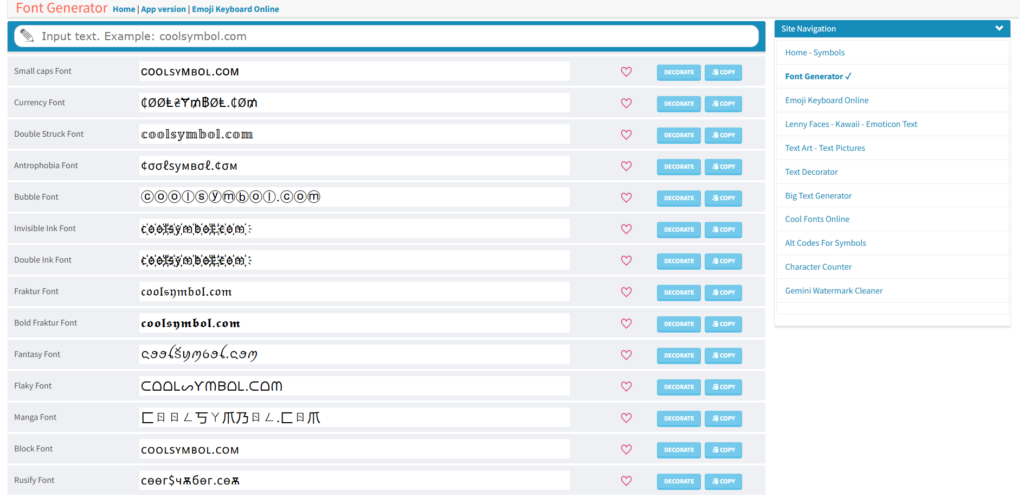
COOLSYMBOL is a feature-rich fancy text generator that’s built for fast copy-and-paste output plus extra decoration options. The layout is practical: you enter text at the top, and the tool generates many Unicode font styles in a scroll-friendly list. Each row shows the font name (like Small Caps, Bubble, Fraktur, Double Struck, and more) along with quick action buttons.
What makes COOLSYMBOL different from many fancy text generator online tools is the “Decorate” option. Instead of only changing letters, you can also add styling details (like decorative elements) to make the final text look more eye-catching for bios, captions, and usernames.
Key Features
-
Large list of Unicode font styles in one view: The tool generates many outputs at once, so you can compare styles quickly without switching pages. Each style is labeled clearly (example: Small Caps, Bubble, Fraktur, Double Struck), which helps you choose faster.
-
Copy button next to each style: Every generated line includes a dedicated copy button, so you don’t need to select text manually. This saves time when testing multiple styles.
-
“Decorate” option for extra styling: Along with font conversions, the tool includes a decorate feature that adds extra formatting elements around the text, useful for Instagram bios, display names, and profile headlines.
-
Favorites/like option for saving styles: The heart icon lets you mark styles you like, which helps when you’re comparing many options in one session.
-
Extra utilities available in the site navigation: The side menu links to related tools (like emoji keyboard, text art, text decorator, big text generator, and character counter), which can support more formatting needs beyond a basic unicode fancy text generator.
Pros and Cons
| Pros | Cons |
| Many styles shown in a clear, labeled list | Interface looks older compared to newer tools |
| Copy button for each font style | Long pages can feel scroll-heavy on mobile |
| “Decorate” option adds extra formatting | Some styles may not display the same in every app |
| Helpful extra tools in the same site | Fewer modern filters than category-based tools |
Best For
Users who want a free fancy text generator with a large style list, one-click copy buttons, and extra decoration options for bios, usernames, and captions.
7. TEXTTRICK – Fancy Text Generator
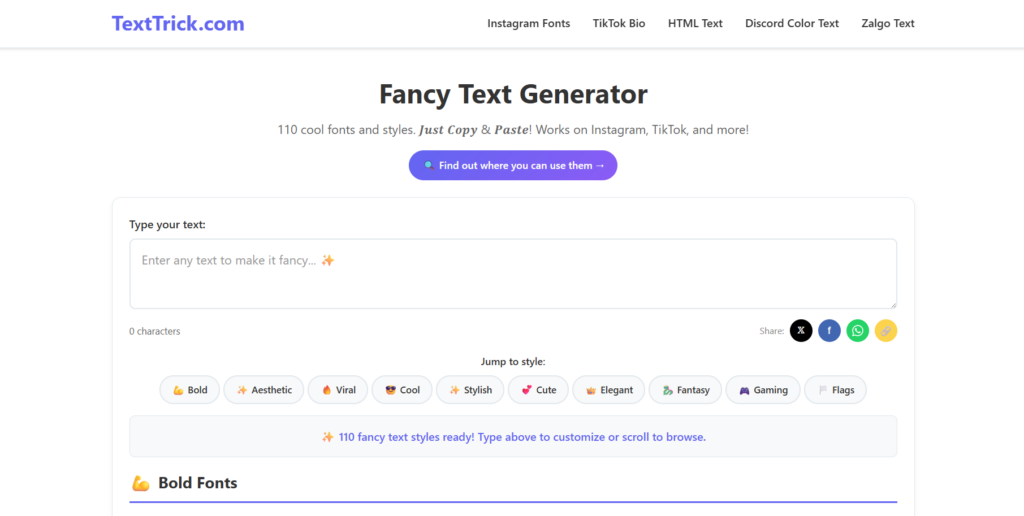
TEXTTRICK offers a modern and category-driven fancy text generator built for social media users. The interface highlights that it provides over 100 fancy text styles, and everything works through simple copy-and-paste output.
This fancy text generator online allows users to type text once and instantly browse different styles organized into sections like Bold, Aesthetic, Viral, Cool, Stylish, Cute, Elegant, Fantasy, Gaming, and more. Instead of scrolling through one long list, you can jump directly to the style category you want.
The layout feels clean and focused on social media usage, especially for Instagram bios, TikTok captions, and Discord usernames.
Key Features
-
110+ Fancy Text Styles Available: The tool offers a large collection of Unicode-based styles, giving users many options for creative usernames, bios, captions, and display names.
-
Category Jump Navigation: Instead of endless scrolling, users can jump directly to style groups like Bold, Cute, Gaming, Elegant, or Aesthetic.
-
Instant Live Text Preview: As you type in the input box, all styles update automatically so you can compare them quickly.
-
Copy-and-Paste Ready Output: Each style is generated in Unicode format, making it easy to copy and use across social platforms.
-
Social Media Focused Design: The layout and categories are clearly built for Instagram, TikTok, Discord, and similar platforms.
Pros and Cons
| Pros | Cons |
| Large variety of categorized styles | May include ads depending on region |
| Easy jump-to-style navigation | Long pages can require scrolling |
| Clean and modern interface | No advanced filtering beyond categories |
| Works well for social media bios and captions | Mostly focused on decorative styles |
Best For
Users who want a free fancy text generator with organized style categories and a strong focus on Instagram, TikTok, and gaming-related text styles.
8. LOREMIPSUM.IO – Font Generator
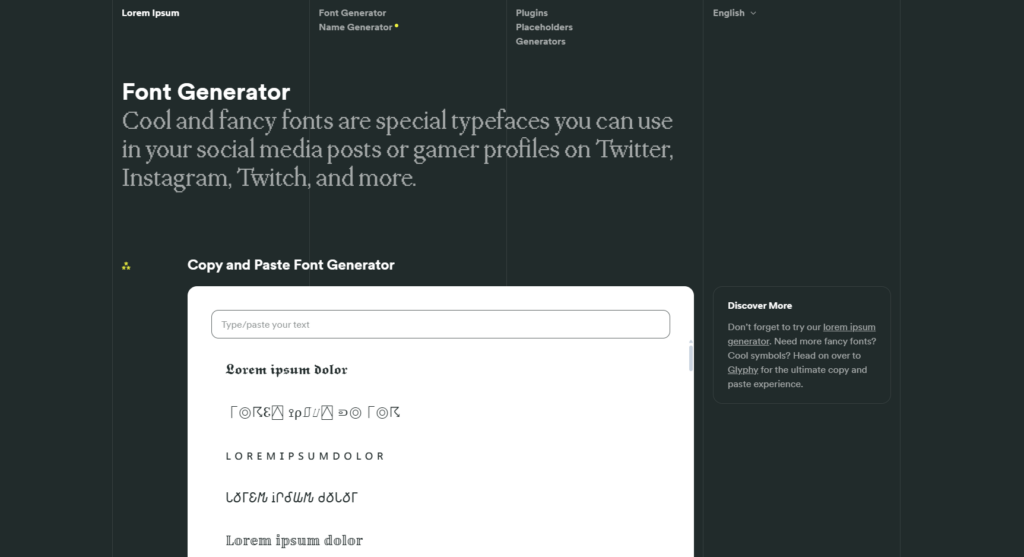
LOREMIPSUM.IO offers a clean and distraction-free fancy text generator that focuses on simple copy-and-paste font conversion. The interface is minimal, with a single input box at the top and multiple generated font styles displayed below in a scrollable section.
This fancy text generator online converts standard text into Unicode-based variations that work across most social media platforms. The layout is dark-themed and straightforward, making it easy to test different styles quickly without extra filters or design tools.
Unlike some feature-heavy platforms, LOREMIPSUM.IO keeps everything simple. It focuses purely on generating stylish fonts that users can copy and use for Instagram bios, Twitter/X posts, Twitch profiles, Discord usernames, and more.
Key Features
-
Simple Copy-and-Paste Font Generator: Users type or paste text once, and multiple styled versions appear instantly below the input box.
-
Clean, Minimal Interface: The layout avoids unnecessary elements, helping users focus on comparing different font outputs.
-
Unicode-Based Font Conversion: All generated styles use Unicode characters, which allows the text to work across major social media and messaging platforms.
-
Scroll-Based Font Display: Multiple font styles are shown in a vertical list, making it easy to browse and select your preferred version.
-
Additional Text Utilities on the Site: The platform links to related tools such as lorem ipsum generators and symbol utilities, which can support content creation needs.
Pros and Cons
| Pros | Cons |
| Clean and distraction-free layout | No category filters for font types |
| Quick font conversion | Fewer style labels compared to some tools |
| Works well for social media use | Mostly focused on basic Unicode styles |
| Easy copy-and-paste functionality | Limited customization beyond font changes |
Best For
Users who want a free fancy text generator with a minimal layout and fast Unicode font conversion for social media posts, gamer tags, and profile names.
9. CREATIVE FABRICA – Stylish Text Generator
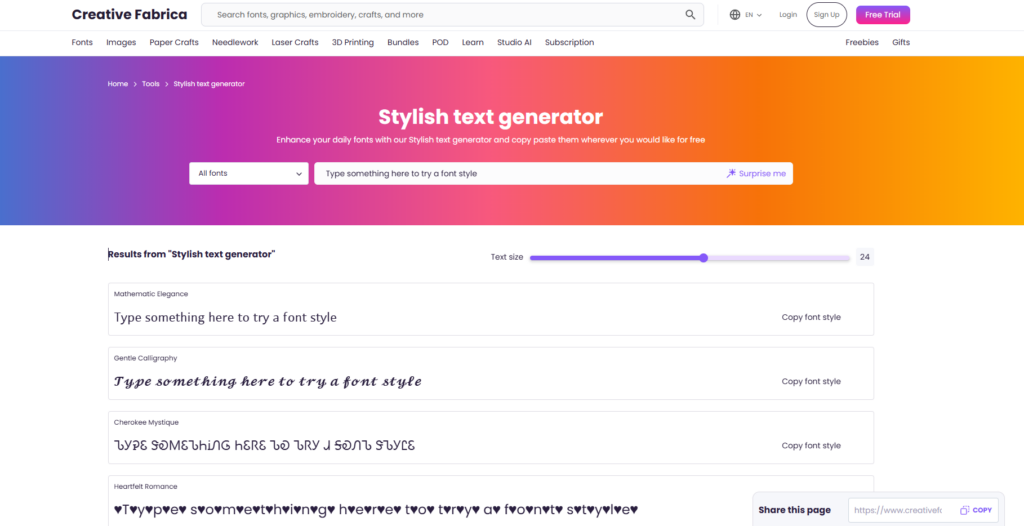
CREATIVE FABRICA offers a polished fancy text generator online under its Stylish Text Generator tool. Unlike basic converters, this tool blends font previews with a more design-focused interface, making it useful for creators, crafters, and branding projects.
The layout includes a font filter dropdown, live text preview, adjustable text size slider, and clearly labeled font styles. Instead of listing raw Unicode variations, CREATIVE FABRICA presents styled outputs in a more structured format, with a “Copy font style” button beside each result.
This tool is part of a larger creative platform, so it connects well with graphic design, craft, and digital font resources.
Key Features
-
Live Stylish Font Preview: Users can type text into the input field and instantly see how it appears in different stylish font variations.
-
Font Style Filter Option: A dropdown menu allows filtering through available styles instead of scrolling endlessly through one long list.
-
Adjustable Text Size Slider: Users can increase or decrease preview size to better compare font readability before copying.
-
One-Click Copy Font Style: Each generated output includes a copy button, making it easy to paste into social media profiles or design tools.
-
Integrated Creative Platform: Since it’s part of CREATIVE FABRICA, users can explore additional fonts, design assets, and creative resources beyond a basic unicode fancy text generator.
Pros and Cons
| Pros | Cons |
| Clean and professional interface | More design-oriented than simple copy-paste tools |
| Adjustable text size preview | Some features may encourage account signup |
| Organized style presentation | Smaller Unicode variety compared to large list generators |
| Good integration with creative resources | Not focused specifically on social media categories |
Best For
Users who want a free fancy text generator with a clean design layout and a connection to a broader creative ecosystem for branding, crafting, and visual content projects.
10. ORIGINALITY.AI – Fancy Text Generator Guide
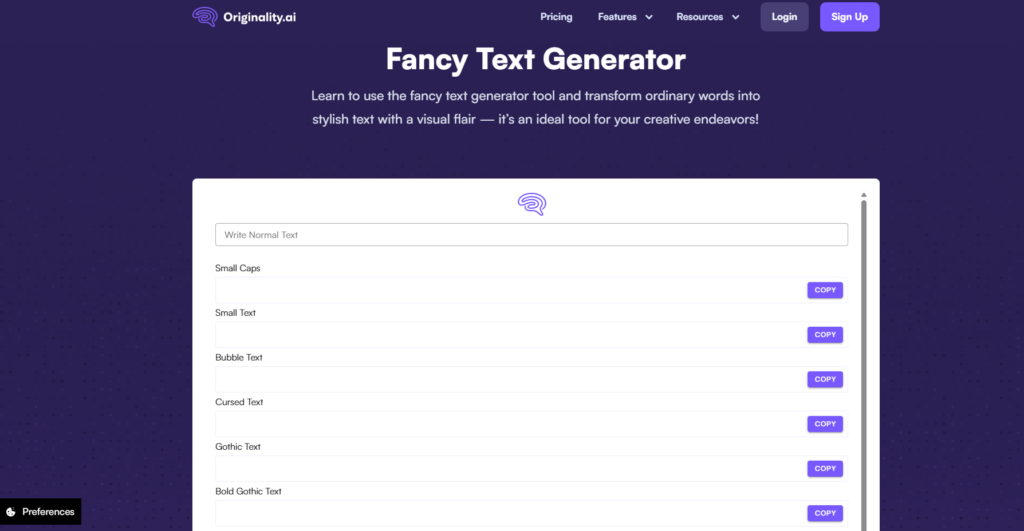
ORIGINALITY.AI doesn’t offer a standalone tool like the others, but it provides an informative fancy text generator guide and example section that explains how Unicode-based font conversion works and how you can use styled text across platforms. Instead of only giving raw outputs, this resource helps users understand what’s possible with Unicode styles and how different text conversions behave in apps like Instagram, TikTok, Twitter/X, or Discord.
The page blends a simple copy and paste font generator section with explanatory text, making it useful for users who want both quick results and background insight into how styled text functions on social media and web platforms.
Key Features
-
Copy and Paste Font Generator Section: Includes a basic input field where users can type text and view several stylized outputs in Unicode font variations.
-
Explanatory Content: Goes beyond simple conversion and explains why and how styled text works using Unicode characters, helping users make better choices for text placement in bios, captions, or profiles.
-
Examples of Different Font Styles: Shows how the same text appears in multiple Unicode formats so users can compare and choose the right output.
-
Context on Social Media Use: The guide clarifies where fancy text is supported and where certain fonts might not render correctly, helping users avoid common compatibility issues.
-
Useful for Beginners & Intermediate Users: This tool + guide combo helps people who want to learn about text styling in addition to generating it.
Pros and Cons
| Pros | Cons |
| Educational explanations included | Fewer font outputs compared to dedicated tools |
| Clear examples of Unicode styles | Not focused solely on text generation |
| Useful guides on where to use styled text | Lacks advanced filtering and categories |
| Shows practical compatibility tips | Minimalist generator section |
Best For
Users who want a free fancy text generator coupled with helpful background information about how styled text works, where it’s supported, and how Unicode influences font appearance across apps.
Best Fancy Text Generator Tools by Use Case
Choosing the right fancy text generator depends on how you plan to use it. Some tools are better for Instagram bios, while others work best for gaming names or design projects.
Here’s a clear breakdown in table format:
| Use Case | Best Tools | Why They’re a Good Fit |
| Instagram Bios & Social Media Profiles | TEXTTRICK, LINGOJAM, COOLSYMBOL | Large variety of stylish Unicode fonts, decorative options, and easy copy-and-paste output for bios and captions |
| Gaming Usernames & Discord Names | FLYERWIZ, TEXTTRICK, LOREMIPSUM.IO | Bold, glitch, bubble, and creative styles that stand out in gamer tags and display names |
| Branding & Design Projects | PICSART, CREATIVE FABRICA, FLYERWIZ | Organized font previews, style filters, and design integration options |
| Quick Copy & Paste Needs | CASECONVERTER.TOOLS, COOLSYMBOL, LINGOJAM | Instant conversion with simple layouts and one-click copy buttons |
| Learning How Unicode Text Works | ORIGINALITY.AI | Includes explanation and examples along with basic font generation |
Each fancy text generator online tool has its own strengths. The best choice depends on whether you want speed, style variety, design support, or educational guidance.
Frequently Asked Questions (FAQs)
1. What is a fancy text generator?
A fancy text generator is an online tool that converts normal text into stylish Unicode characters. Instead of changing the actual font file, it replaces standard letters with decorative symbols that look like different font styles. You can copy and paste the result into social media apps, gaming platforms, and messaging tools.
2. Is a fancy text generator free to use?
Most fancy text generator online tools are completely free. You don’t need to download software or create an account. Simply enter your text, copy the styled version, and paste it wherever you need.
3. Do fancy text generators work on Instagram and Discord?
Yes. A unicode fancy text generator creates text using Unicode characters, which are supported by most platforms, including Instagram, Discord, TikTok, Facebook, and Twitter/X. However, some rare styles may not display perfectly on every device.
4. Can I use fancy text for gaming usernames?
Yes. Many gamers use a free fancy text generator to create stylish usernames for games like Roblox, Minecraft, PUBG, and other online platforms. Just make sure the game supports special Unicode characters before finalizing your name.
5. Is fancy text safe to use?
Yes. A fancy text generator only converts characters and does not modify your device or account. You are simply copying styled Unicode text and pasting it into another platform.
6. Why does some fancy text not display correctly?
Some apps or older devices may not fully support certain Unicode characters. If a style does not appear correctly, try another variation from the same fancy text generator online tool.