
Weird Text Generator | 🐻 ⓌєĮʳᗪ Ƒ𝐎ήT𝓢 ¢𝓸ρⓨ A𝔫𝕕 ᵖάSţε 🐧
Our Weird Text Generator, also called a Zalgo text generator, lets you create 80+ unique, eye-catching styles. From weird font looks and crazy text to funny symbols, it turns plain input into standout output you can copy in seconds.
Type your text, pick a style, and paste it anywhere you like. If you came here for a funny font generator or a weird text font generator, this tool covers those needs, too. For a deeper background on how characters carry style across apps, see the Unicode Standard.
Input Text
Output
A-- A++Unicode → plain text
Paste styled Unicode text to strip formatting and get plain ASCII back.
Our weird text generator works by applying Unicode combining symbols and diacritic marks to your characters, producing effects that range from glitchy, shaky, and “cursed” lettering to stylized weird fonts.
This approach keeps the original letters intact while layering marks above, through, and below to change the visual appearance.
Use it for social posts, bios, captions, chats, or creative layouts, ideal when you want to make weird text or try a goofy text generator vibe.
It’s also a quick fit for crazy fonts copy and paste moments, a playful freaky font generator effect, or more niche looks like a shaky, cryptic, or eldritch text generator. The styles paste cleanly on most platforms and help your words stand out without extra design tools.
Why Use This Crazy Text Generator?
Our weird text generator is perfect for making playful, eye-catching styles with minimal effort. Here’s why you’ll like it:
- Quick results: Turn plain input into crazy text in a click. The tool layers characters with Unicode combining marks to create intense visual effects without manual formatting.
- Works in many places: Paste styles into social posts, bios, chats, and captions. Most platforms show the effects, but test short snippets first to keep messages readable.
- Simple to use: Type, pick a look, and copy. If you want stronger “glitchy” or “cursed” looks, choose heavier marks; for subtle looks, choose lighter marks.
- No installs: 100% browser-based, so you can create crazy fonts copy and paste outputs on any device. It’s fast and private, no file uploads.
Where You Can Use This Funny Text Generator
The funny font generator works across many platforms, so you can make posts and messages stand out without extra tools. Here’s how to put it to work:
Social media:
Add weird text to posts, bios, and comments on Instagram, Facebook, or X (Twitter). Keep lines short so feeds don’t clip, and switch to lighter styles if boxes or missing glyphs appear.
Messaging apps:
Use playful looks in WhatsApp, Discord, and Telegram. Test a brief sample first so stacked marks stay readable on small screens. For quick reactions, a silly text generator or goofy text generator style makes one-liners pop.
Creative projects:
Paste outputs into thumbnails, posters, invites, or stream overlays. Pair heavier styles with headers; keep body text plain for clarity.
Gaming and usernames:
Some launchers/forums block combining marks in handles. Try subtle variants for lobbies and display names, and save bold looks for guild posts or profiles.
How to Use the Weird Text Generator?
Using the weird text generator is simple and straightforward, allowing you to transform regular text into unique and eye-catching designs in just a few steps:
1. Enter Your Text: Type or paste your message into the input box. Keep it short for the first try (for example: “Hello! How are you?”), then expand as needed.
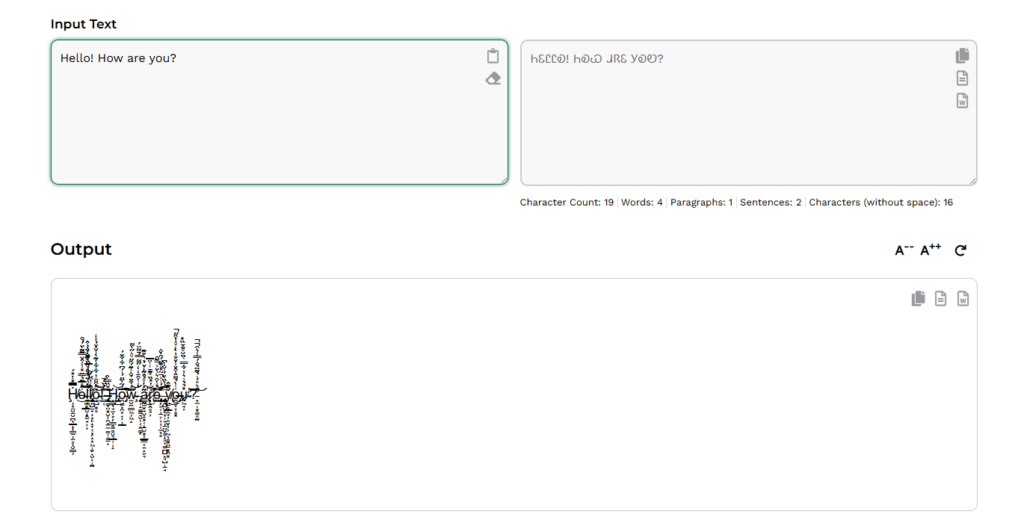
2. Choose a Style: Scroll the list and pick the look you like, from subtle to stacked marks (e.g., glitchy, freaky, or a lighter crazy fonts generator style). Try a few to see what fits your post or bio.

3. Copy and Paste: Click copy next to the result, then paste into social posts, chats, captions, or headers. If a platform shows boxes or trims lines, switch to a lighter style and try again.
Why Use Our Weird Font Generator?
Our Weird Font Generator is packed with features that make it the best choice for creating weird text and crazy fonts. Here’s what makes our tool stand out:
1. 80+ looks for any vibe:
Pick from a broad set of styles, subtle, stacked, creepy, funny, and bold, so your text fits posts, bios, or captions. From weird font effects to crazy text, you can switch styles in seconds without extra design tools.
2. Fast, copy-ready output:
Type or paste once and see instant previews. One click gives you crazy fonts copy and paste results you can drop into chats, profiles, or thumbnails. It’s a simple way to use a weird text generator for quick standout lines.
3. Private and free to use:
Everything runs in your browser, no file uploads, logins, or saved data. Create weird letters and symbols anytime with zero cost or friction on any connection.
4. Works across devices and apps:
Use it on phone, tablet, or computer, then paste into major platforms. If a site limits characters or shows blank boxes, pick a lighter style and try again; the tool makes swapping options quick.
Frequently Asked Questions (FAQs)
It’s a browser tool that converts plain text into styled output using Unicode combining marks. Our weird text generator lets you copy the results anywhere that supports Unicode.
Not exactly. These are Unicode characters and marks, not image fonts. That’s why crazy fonts copy and paste results work in most apps without installing anything.
Social posts, bios, comments, chats, captions, and thumbnails. If a site shows blank boxes, switch to a lighter style or shorter line.
Heavy stacking can reduce legibility. Pick a lighter style or trim the length. For headers, bold looks work; for longer messages, use a subtle set.
Choose styles with more or fewer combining marks. Start light, then increase until it fits your post.
Most, yes. Older devices or strict fields (usernames, emails, forms) may block certain marks. Test a short sample before posting.
Yes. Everything runs in your browser. No uploads or logins.
Yes. Try styles that match a funny font generator or goofy text generator vibe for quick one-liners.
For intense effects, pick styles similar to freaky font, shaky text, or eldritch text generator. For simpler posts, use a weird font or crazy letter generator style.
Some platforms allow it; others restrict special characters. If it fails, switch to a lighter weird text font generator variant or keep marks out of the handle and use them in your bio.