
JSON Formatter and Validator
Our JSON Formatter and Validator helps you format JSON, validate JSON syntax, and minify JSON instantly. Paste your data into our online JSON formatter and validator to beautify messy code, detect errors, and ensure your structure is correct in seconds.
Formatted JSON
Our JSON Formatter and Validator helps you fix that instantly. Paste your JSON data into our tool to format it with proper indentation, check for errors, and view it in a clear, readable structure. Whether you are testing an API response, editing a configuration file, or reviewing structured data, our tool makes the process simple and fast.
You can beautify messy JSON, validate its syntax, and minify it for production use, all in one place. Everything runs directly in your browser, so your data stays private.
Start by pasting your JSON above and let our tool handle the formatting and validation for you.
What Is JSON?
JSON stands for JavaScript Object Notation. It is a lightweight format used to store and exchange structured data between systems.
Most modern applications use JSON to send data between servers and browsers. For example, when you log into an app, load a product page, or request data from an API, the information is often delivered in JSON format.
JSON is built using:
- Key–value pairs
- Objects (data inside curly braces { })
- Arrays (lists inside square brackets [ ])
Here’s a simple example of JSON:
					{
  "name": "John",
  "age": 30,
  "skills": ["JavaScript", "Python", "API Development"]
}
While JSON is easy for machines to process, it is not always easy for humans to read, especially when it appears in one compressed line without spacing. That’s where formatting and validation become important.
What Does a JSON Formatter and Validator Do?
A JSON formatter and validator helps you clean, organize, and verify your JSON data. When JSON is compressed into a single line, it becomes difficult to read. If there is even one small syntax mistake, the entire structure can fail.
Our tool solves both problems in one place.
1. JSON Formatting
Formatting, also called pretty printing, adds proper spacing and indentation to your JSON data. This makes it easier to read, review, and edit.
Well-formatted JSON helps you:
- Understand nested objects
- Identify key value pairs clearly
- Debug API responses faster
2. JSON Validation
Validation checks whether your JSON structure follows proper syntax rules. If there is an error such as a missing comma or incorrect bracket, our tool highlights the issue so you can fix it quickly.
Common validation checks include:
- Missing or extra commas
- Incorrect quotation marks
- Unclosed brackets
- Invalid characters
3. JSON Minification
Minification removes extra spaces and line breaks from JSON data. This reduces file size and is useful when sending data in production environments.
By combining formatting, validation, and minification, our tool helps you manage JSON data with clarity and confidence.
How to Use Our JSON Formatter and Validator
Our tool is designed to make formatting and validating JSON quick and simple. Follow these steps:
Step 1: Paste or Upload Your JSON

You can either:
- Paste your JSON into the input box
- Click Upload File to load a JSON file
- Use Sample Code to test the tool
The character count, word count, and line count are shown automatically below the editor.
Step 2: Choose Indentation Settings
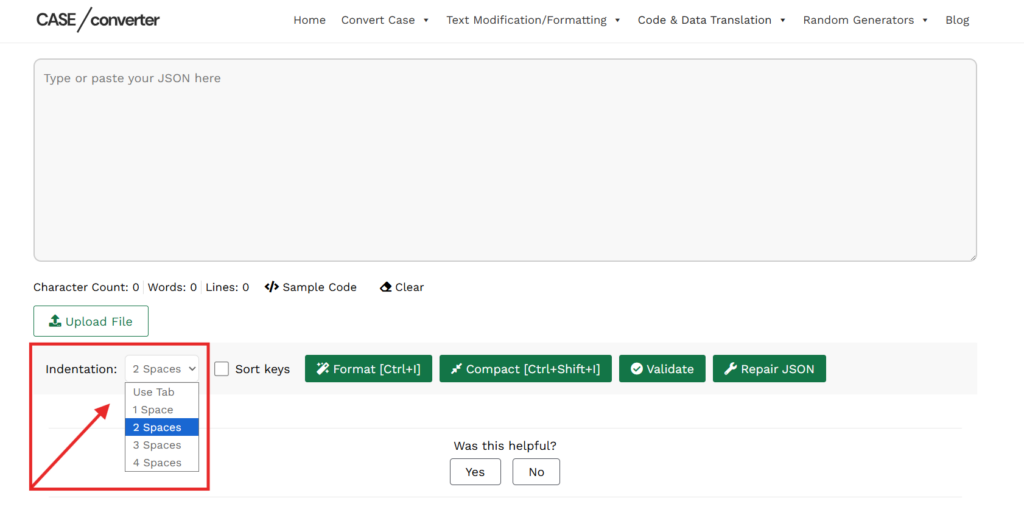
Select your preferred indentation style from the dropdown:
- Use Tab
- 1 Space
- 2 Spaces
- 3 Spaces
- 4 Spaces
You can also enable Sort Keys if you want the JSON keys to be arranged alphabetically.
Step 3: Select an Action
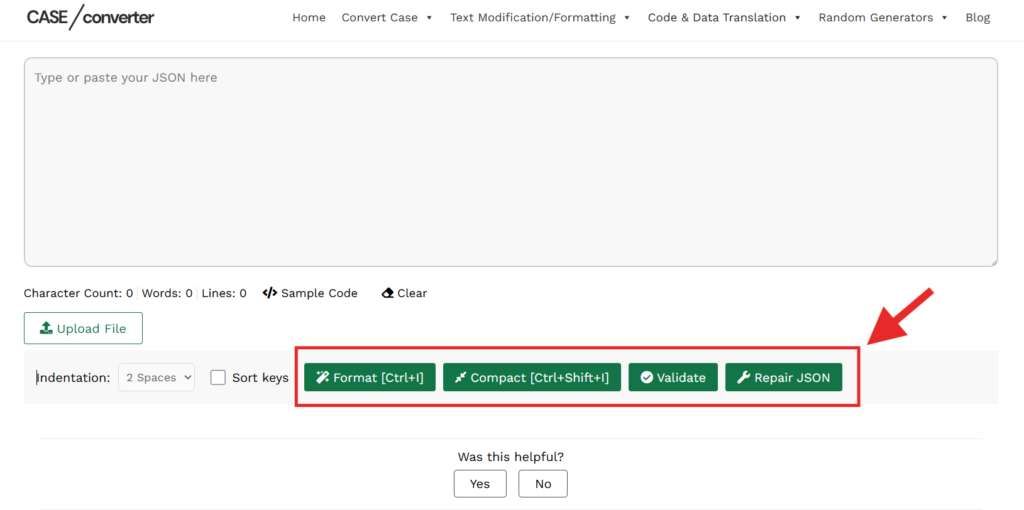
You can now choose what you want to do:
- Format to beautify your JSON with proper indentation
- Compact to remove spaces and create a minified version
- Validate to check if your JSON structure is correct
- Repair JSON to automatically fix certain formatting issues
Keyboard shortcuts are also available:
- Ctrl + I for Format
- Ctrl + Shift + I for Compact
Step 4: View and Copy the Output
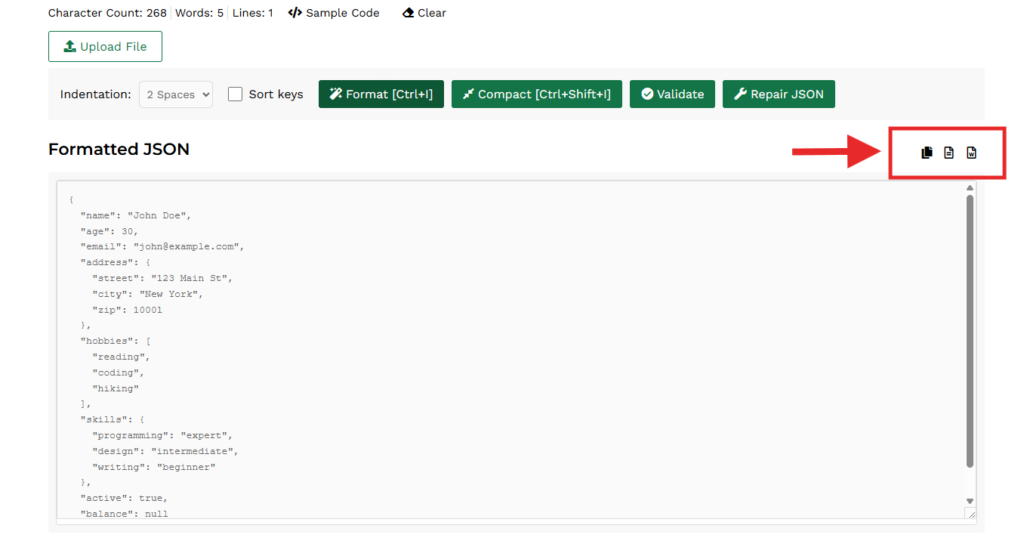
The formatted JSON appears in the output section below.
You can:
- Copy the formatted result
- Download it
- Clear the editor if needed
If there is a validation error, the tool will indicate that the JSON is not valid so you can correct it. Everything will runs directly in your browser.
Features of Our JSON Formatter and Validator
Our tool includes practical features that make working with JSON easier and more controlled.
- JSON Formatting: Beautify raw JSON with proper spacing and indentation to improve readability.
- JSON Compact Mode: Remove unnecessary spaces and line breaks to create a smaller, production ready version.
- JSON Validation: Check whether your JSON structure follows proper syntax rules.
- Repair JSON Option: Attempt to automatically correct common formatting issues in your JSON data.
- Multiple Indentation Options: Choose between tabs or 1 to 4 space indentation levels.
- Sort Keys: Sort JSON object keys alphabetically for consistent structure.
- File Upload Support: Upload a JSON file directly instead of pasting content manually.
- Character, Word, and Line Counter: See real time statistics for your input JSON.
- Keyboard Shortcuts: Quickly format or compact JSON using keyboard commands.
JSON Formatter vs JSON Validator
Many people use these terms together, but they serve different purposes.
A JSON formatter improves readability. It adds spacing and indentation so the structure becomes easy to understand.
A JSON validator checks whether the JSON follows correct syntax rules. It identifies errors that could break your application or API request.
Here is a simple comparison:
Feature | JSON Formatter | JSON Validator |
Adds indentation | Yes | No |
Improves readability | Yes | No |
Detects syntax errors | No | Yes |
Confirms valid JSON structure | No | Yes |
Our tool combines both functions in one place. You can format and validate your JSON without switching between different tools.
Common JSON Errors and How to Fix Them
JSON is strict about its structure. Even a small mistake can cause parsing errors. Below are the most common issues developers face.
Missing Commas
Every key value pair must be separated by a comma. If a comma is missing, the JSON becomes invalid.
Trailing Commas: JSON does not allow a comma after the last item in an object or array.
Unquoted Keys: All keys must be enclosed in double quotation marks.
					Incorrect: {name: "John"}
Correct: {"name": "John"}
Unclosed Brackets: Objects use curly braces and arrays use square brackets. If one is not properly closed, validation will fail.
Invalid Data Types: JSON supports strings, numbers, objects, arrays, booleans, and null. Unsupported values can cause errors.
Our tool helps you identify these issues quickly so you can correct them without manually scanning the entire structure.
Frequently Asked Questions
How do I format JSON online?
To format JSON online, paste your raw JSON into the input box and click the Format button. Our tool automatically adds indentation and spacing so the structure becomes easy to read and edit.
How do I validate JSON data?
To validate JSON, paste your JSON into the input area and click Validate. Our tool checks the structure and highlights any syntax errors such as missing commas or incorrect brackets.
Can I format and validate JSON at the same time?
Yes. Our tool allows you to format and validate JSON in one place. You can beautify the structure and check for errors without switching between different tools.
Is this an online JSON formatter and validator?
Yes. Our tool works entirely online in your browser. There is no installation required.
Is my JSON data secure?
Yes. All formatting and validation processes happen directly in your browser. Your JSON data is not stored or transmitted.
Can I minify JSON using this tool?
Yes. In addition to formatting and validation, our tool allows you to remove extra spaces and line breaks to create a compact version of your JSON.