
Online Vibration Simulator
Our Online Vibration Simulator lets you check your phone’s vibration motor right in the browser. No apps or setup required. Open the tool, set a duration, and start testing in seconds.
For feature verification or hardware checks, this vibration test online tool runs fast on most modern mobile browsers. It starts and stops on demand, and it respects your device’s system vibration settings and permissions.
Use our Online Vibration Simulator to test your phone’s vibration motor right in the browser. No install. No signup. Pick a time and tap the button to begin.
Run a quick check, or set it to vibrate your phone for 5 minutes straight. It’s clean and simple, and it works on most phones, Android or iPhone. Note: web vibration controls can’t adjust motor strength; intensity is set by your device.
Our tool is built for speed, lightweight code, minimal requests, and no clutter, so the test starts promptly and stays responsive.
For hardware tests, live demos, or casual use, it gets the job done. You can also use it as a phone vibration test when your device’s settings fall short. If nothing happens, confirm vibration is enabled in system settings and try an updated mobile browser.
What Is an Online Vibration Simulator?
An Online Vibration Simulator is a browser tool that makes your phone vibrate on command. No app install and no account, open the page on your phone and follow the simple controls for a quick phone vibration test.
It’s a fast way to run a vibration test online. Visit the page, choose a duration (short buzz or a longer run), and tap the button. On supported devices and browsers, your phone responds right away, handy when you want to make your phone vibrate online without digging into system menus.
This tool triggers the vibration motor for testing. It’s simple and quick, and it works on most mobile browsers. Vibration strength comes from your device settings (the web can’t change intensity). For the most reliable result, use a phone instead of a desktop when running a phone vibration test.
Key Features of Our Online Vibration Simulator
- Preset Durations: Choose quick options like 1 second, 2 seconds, or 5 seconds with one tap. Start and stop instantly for repeatable checks.
- Custom Time Entry: Set your own duration, useful when you want to vibrate my phone for 1 minute or run longer tests like 2–5 minutes without interruptions.
- One-Click Vibration Start: Tap the Vibrate button and your phone buzzes right away. A Stop control lets you end the phone vibration test at any time.
- Live Timer Countdown: Watch a clear countdown while the vibration runs so you can confirm exact durations to the second during a vibration test online.
- Mobile Browser Support: Works on most Android and iOS browsers that support the Vibration API. For the most reliable results, run it on a phone (some desktops ignore vibration) and ensure system vibration is enabled.
- Simple and Fast Interface: Clean layout, quick loading, and responsive controls, even with ads, so tests start fast and stay smooth.
How to Use the Online Vibration Test Tool
Using our vibration test online tool is straightforward. You don’t need to install anything or create an account. Just follow these steps:
Step 1: Choose a Vibration Duration

Choose a Vibration Duration. Tap any preset button:
- Vibrate 1 Second
- Vibrate 2 Seconds
- Vibrate 5 Seconds
Step 2: Or Set a Custom Time
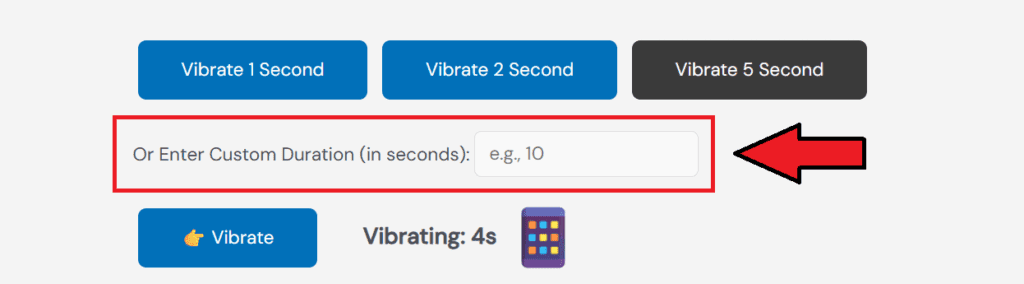
Set a Custom Time. Want a longer or specific test? Enter the time in seconds. You can type values like 10, 15, or more as needed, for example, to vibrate my phone for 1 minute (enter 60).
Step 3: Tap the Vibrate Button

Tap the Vibrate Button
Once your time is set, hit the 👉 Vibrate button. Your phone will start buzzing right away on supported devices. If nothing happens, make sure vibration is enabled in system settings and try a modern mobile browser for a reliable phone vibration test.
Step 4: Watch the Timer

Watch the Timer. The screen shows a live countdown, so you know how long the vibration will last. Use the Stop control anytime to end the test early.
That’s it. Fast and clear. It works as a full phone vibration test tool right in your browser, so you can make your phone vibrate online without installing anything.
Use Cases for Mobile Vibration Testing
Our Online Vibration Simulator is more than a buzz button. Here’s where it helps most:
- Phone Vibration Test: Need to confirm your vibration motor works? Run a direct phone vibration test in the browser, no app installs, no cables, and results in seconds.
- Hardware Check Before Selling: Selling your phone or buying a used one? Open the vibration test online tool on the device and run a quick buzz to confirm the motor is functional. It’s a simple proof step for meetups and trade-ins.
- Silent Mode Alerts: Simulate notifications when sound is off to confirm behavior, including vibrate on silent iPhone and Android alert patterns. Use the tool to phone vibrate online and verify you feel calls and messages while muted.
- Demo or Development Testing: Students and developers can show how browser-based vibration works in real time during lessons or demos. Use it to illustrate permissions, support, and timing for a clear phone vibration test example.
Run Longer Vibration Sessions: Need extended vibration for testing or personal use? Enter any custom time, e.g., 60 or 300 seconds, to vibrate my phone for 1 minute or vibrate my phone for 5 minutes without installing anything.
Why Use This Online Vibration Test Tool?
There are other ways to check vibration, but many take time or require apps. Our Online Vibration Simulator keeps it simple so you can run a quick vibration test online right from your browser.
- No Downloads or Setup: You don’t need to install anything. Open the site, set the time, and press Vibrate. It works instantly for a fast phone vibration test.
- Works on Modern Devices: On Android or iPhone, the tool runs in most mobile browsers that support vibration features. For best results, use your phone (some desktops ignore vibration).
- Useful for Quick Checks: Use it to run a vibration check online anytime, no digging through settings or adding new apps. If nothing happens, confirm system vibration is enabled.
Set Any Duration: From short pings to longer checks, you control the timer. It’s a clean way to make your phone vibrate online for targeted tests (e.g., 60s or 300s) without extra steps.
FAQs
How does it work?
It triggers your phone’s motor via the browser’s Vibration API. Open the page, set a time, tap Vibrate to make your phone vibrate online.
Which phones/browsers are supported?
Most Android phones in Chrome/Chromium browsers work. iPhone support can be limited by iOS. For a reliable phone vibration test, use a recent mobile browser on your phone (desktop often ignores vibration).
Can I change vibration strength or pattern?
No. The web API can only start/stop vibration for set durations. Intensity and feel come from your device settings.
Why didn’t my phone vibrate?
Check system vibration is on, use a supported mobile browser, keep the page in the foreground, and allow permissions. If needed, restart the browser/device and rerun the vibration test online.
Can I run long tests (1–5 minutes)?
Yes. Use custom time, enter 60 to vibrate my phone for 1 minute or 300 to vibrate my phone for 5 minutes. The timer shows progress and you can stop anytime.