Fake Instagram Post Generator

Create clean and realistic posts with our fake Instagram post generator. This tool lets you customize everything,  profile photo, username, image, caption, likes, comments, and more. 

No login. No watermark. Just a simple way to build and download posts for mockups, planning, or fun. If you need a fast and flexible Instagram post maker, this tool is made for it

Post Details

Theme

Verified Badge

Instagram Story

People Tagged


Comments Details

Preview

avatar
caseconverter.tools
New Jersey, USA
avatar
1.2K likes
This is a sample text. @mention friends and add #hastags
View all 423 comments
steverogers On your left 😉
buckybarnes Yeah!
5 DAYS AGO
Was this helpful?
We're sorry. 🙁
Email Address * We ask for your email so we can let you know once the issue is fixed. No spam, promise!

Our Fake Instagram Post Generator is an online tool that lets you build a realistic Instagram post from scratch. You don’t need to log in or install anything. Just open the tool and start creating.

You can customize everything, profile photo, username, location, caption, image, likes, comments, time, and even the theme. Every element looks like a real Instagram post.

This tool is made for creators, social media teams, and designers. It’s useful for client mockups, content planning, training, or making fun sample posts. You get full control over the design and content without the limits of the real app.

We don’t add watermarks. You don’t need an account. And the post is ready to download in one click.

If you’re looking for a clean, fast, and accurate Instagram fake post maker, this tool does the job.

Why Would You Want To Make a Fake Instagram Post?

There are many reasons to use a fake Instagram post maker. It’s not just for fun, it’s a useful tool for real work.

  1. Client Mockups: Show clients how a post will look before publishing. Helps with approval and feedback.
  2. Content Planning: Plan your posts visually. Build drafts before sharing on your real account.
  3. Training: Teach Instagram layout and features without needing a real profile.
  4. Portfolio Samples: Create clean examples for a portfolio or pitch.
  5. Entertainment: Make fake posts for jokes, memes, or light social content.

This tool saves time. No need to take screenshots or edit templates. Just fill in the details and download the post. If you need to make fake Instagram posts for any reason, this tool gives you a quick and simple way to do it.

Key Features of This Instagram Post Generator

Our Instagram post generator is packed with everything you need to create a clean and realistic mock post. Here’s what you can customize:

  • Profile Picture – Upload any image to set as the display picture.
  • Username – Add a custom username.
  • Location – Mention any place, song, or tag line.
  • Post Text – Write your caption, include @mentions and #hashtags.
  • Post Image – Upload any image for the post content.
  • Likes and Comments – Set exact numbers as needed.
  • Comment Section – Add two fake comment usernames and text.
  • Post Time – Choose how many days ago the post was made.
  • Theme – Switch between Light, Dim, or Dark modes.
  • Verified Badge – Show or hide the blue check mark.
  • Instagram Story Ring – Optional story ring.
  • Tagged People – Add or remove people tags.

You get full control without any coding or editing. This Instagram fake post maker lets you preview everything in real time before downloading.

How To Use the Fake Instagram Post Maker

Here’s how to use our Instagram post maker fake tool. Every step is simple, clear, and works directly in your browser. No login or extra software needed.

Step 1: Upload Basic Info

Upload Basic Info

Start by uploading the profile picture. Then, enter the username and location (you can use a city, song, or custom text).

Example: caseconverter.tools from New Jersey, USA

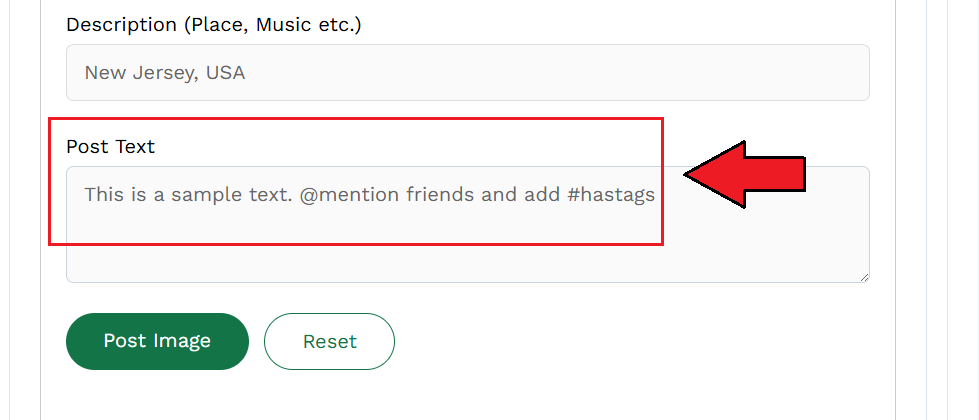
Step 2: Write the Caption

Write the Caption

In the “Post Text” box, type your caption. You can add:

  • @mentions
  • #hashtags
  • Emojis

Example: This is a sample text. @mention friends and add #hashtags

Step 3: Upload Post Image

Upload Post Image

Click “Post Image” to upload the main image. This is what shows in the feed preview.

You can upload any JPG or PNG file.

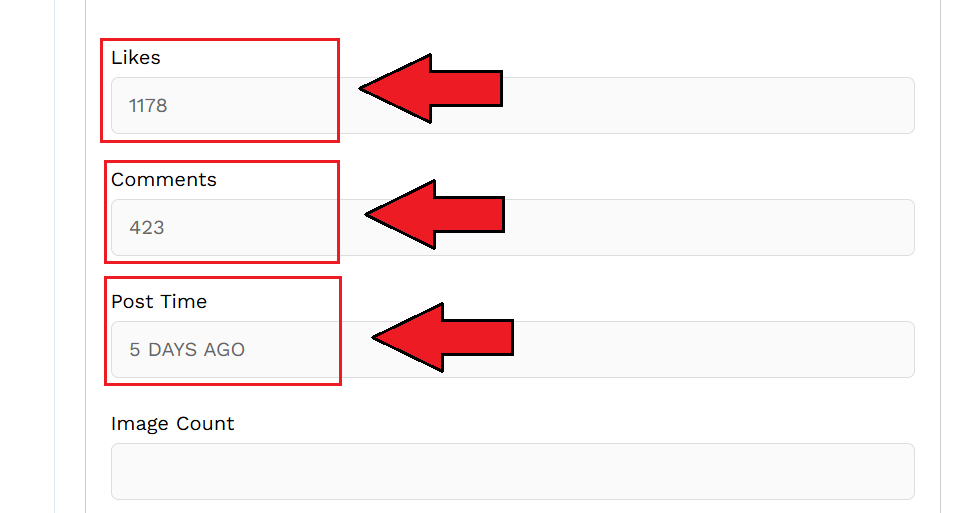
Step 4: Set Likes and Comments Count

Set Likes and Comments Count

Add the number of likes and comments. You can type any number.

Example: 1178 likes, 423 comments

Step 5: Adjust Post Settings

Adjust Post Settings

Set how many days ago the post was made. Then pick a theme: Light, Dim, or Dark. You can also choose to:

  • Show/hide the verified badge
  • Add or remove story ring
  • Show or hide tagged people

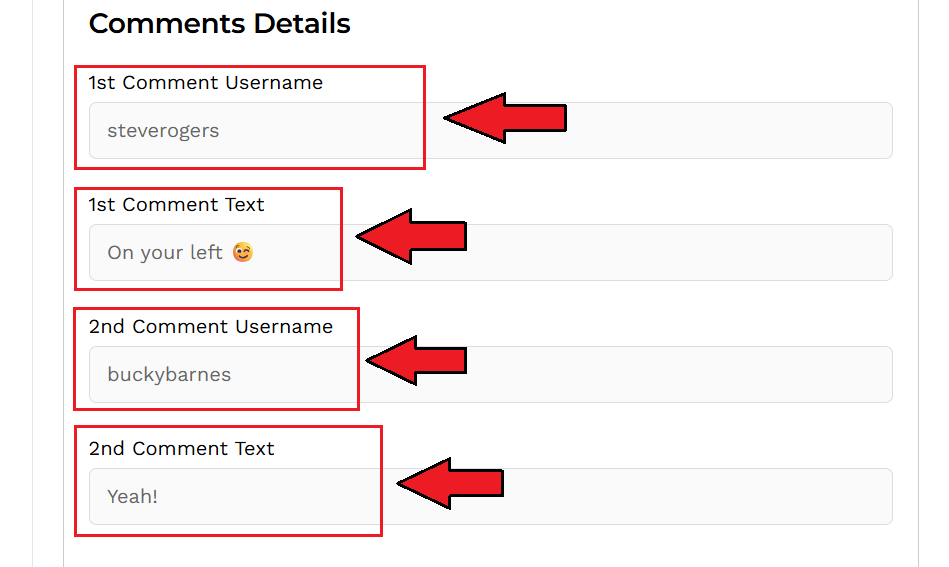
Step 6: Add Comment Details

Add Comment Details

You can add up to 2 visible comments.

  • Fill in username and text for each comment.
  • Emoji support is included.

Example:

  • steverogers: On your left 😁
  • buckybarnes: Yeah!

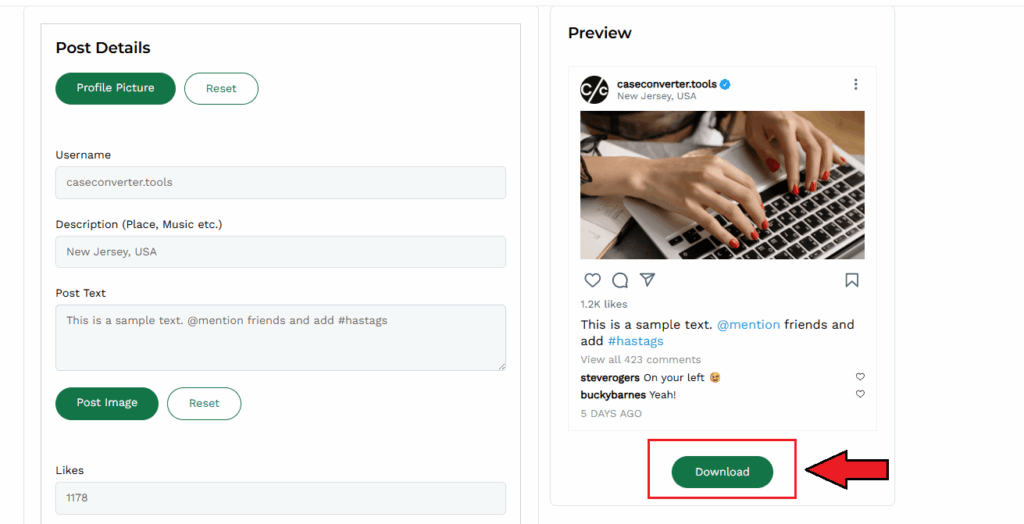
Step 7: Download Your Post

Download Your Post

Preview your fake post on the right side. When it looks right, click the Download button to save it as an image.

No watermark. No login. Just one click.

What Makes This Instagram Fake Post Maker Better?

There are many fake post tools online, but most are limited or outdated. Here’s why ours stands out:

  1. Full Customization: You can edit every part of the post, from profile image to comment text. It’s more than just a caption and photo. You control the whole layout.
  2. Real-Time Preview: You see changes live as you type. The post on the right updates instantly. No need to refresh or click around.
  3. No Watermark, No Login: Some tools add logos or ask for sign-up. Ours doesn’t. You get a clean post without any branding or extra steps.
  4. Simple and Fast: The interface is clean. It loads fast. You can create and download a full fake post in under a minute.
  5. Download-Ready: Click one button to save your post as an image. No cropping. No editing. Just ready to use.

If you’re looking for a reliable Instagram fake post generator, this tool does the job, clean, fast, and accurate.

FAQs

Is this fake Instagram post generator free to use?

Yes. Our tool is 100% free. No hidden charges, no sign-up.

No. You don’t need an account. Just open the tool and start using it.

Yes. After editing, click the Download button. The post saves as an image without any watermark.

Yes. You can add two custom comment usernames and text. Emojis work too.

Yes, if used for design, training, demos, or fun. Don’t use it to impersonate or mislead others.

Yes. You can choose between Light, Dim, or Dark to match Instagram’s real UI.

Scroll to Top