
Stacked Text Generator — Stack Fonts, Copy & Paste Free
Our Stacked Text Generator lets you place one line of text directly above another to create a clean, layered layout. Type your top and bottom lines, see the result instantly, and copy it in one click.
Use it for stacked name logos, tattoo lettering, Discord names, YouTube thumbnails, social media posts, or any design that needs bold, vertical text.
Adjust the preview size, copy to clipboard, or download as a text file. The whole process takes under 30 seconds.
Output
A-- A++Want to turn plain text into a bold, stacked format? Our Stacked Text Generator makes it fast and easy.
This tool lets you stack words one over the other to create a clean, sharp visual layout. Use it to build unique headers, logos, or graphics for social media. It’s also great for stacked name logos, tattoos, monograms, and even stacked signs.
You don’t need any design tools or font packs. Just enter your text, adjust the size, and copy or download your result. The tool works in your browser, no installs, no sign-ups.
It also plays well with different styles. You can use the output in a Discord font, pair it with tiny text styles, or mix it with other weird text formats for a more custom feel.
We built this for creators who want better control over how their words look. From tight double stack fonts to flowing wavy stacked fonts, it’s all just a few clicks away.
What Is a Stacked Text Generator?
A Stacked Text Generator is an online tool that takes two separate lines of text and positions one directly above the other. The output is a clean, vertical layout you can copy and use anywhere, no design skills needed.
This is different from Unicode stacking tools (like the Leͥgeͣnͫd style), which layer characters within a single word using combining marks. Our tool stacks full lines, top text sits above bottom text, making it better for names, logos, tattoos, and multi-word layouts where clean spacing matters.
It is commonly used for:
- Stacked name logos and monograms
- Tattoo lettering layouts
- Discord usernames and gaming profiles
- Instagram and TikTok post text
- YouTube thumbnail titles
- Double-line text for posters and banners
- Custom stacked font previews before sending to a designer
Type your two lines, adjust the size, and copy the result in one click. The tool works in your browser with no install and no account required.
Features of Our Tool
Our Stacked Text Generator Tool was built to keep things simple, fast, and flexible. Here’s what it offers:
- Instant Output: Your text updates live as you type. No need to reload or press extra buttons.
- Dual-Line Input: Add a top and bottom line of text. This makes it easy to build stacked fonts and stacked names.
- Adjustable Preview Size: Use the slider to resize the output. View small or large text instantly.
- Download Options: Export your stacked text as a plain file or Word doc. You can also copy it to your clipboard in one click.
- No Login Needed: The tool is free to use. No sign-up, no limits.
- Browser-Based: Works on any device, mobile, desktop, or tablet. No app install needed.
- Perfect for Multiple Uses: Use it for stacked signs, stacked letter tattoos, double stack fonts, or even custom stacked name logos.
From casual users to graphic creators, our tool fits a wide range of needs. Whether you’re crafting a bold title or a fun post, it’s ready to go.
How Our Stacked Text Generator Tool Works
Using our tool is quick and simple. You don’t need any design background or special software.
Here’s how it works, step by step:
1. Add Your Text

You’ll see two input fields:
- Top Text – This is the first line that appears above.
- Bottom Text – This line is placed directly under the top one.
This setup is perfect for creating stacked letters, double line text, or even custom name logos with style.
2. Preview the Stack

Once you enter both lines, the tool shows a live preview. The layout updates instantly so you can test different combinations.
You can create layouts like: IͨnͬSͤtͣRͭaͦGͬram
3. Adjust the Preview Size

There’s a slider right below the preview. Use it to make the text larger or smaller, depending on where you plan to use it
4. Export or Copy
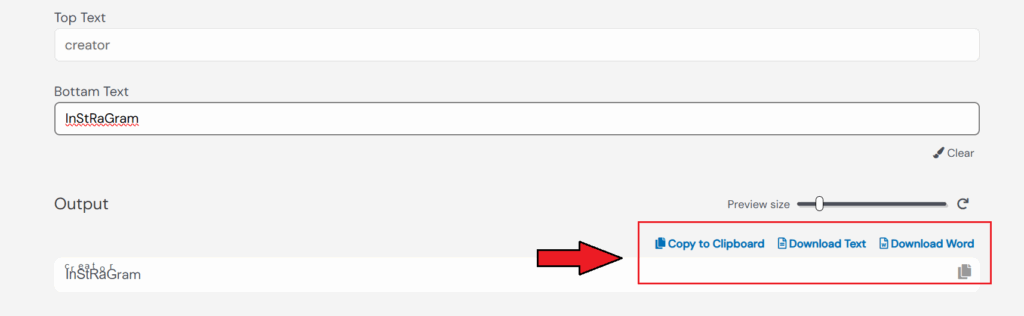
Choose how you want to save your output:
- Click Copy to Clipboard to paste it anywhere.
- Or download it as a text file or Word document.
5. Clear and Start Again
Click the pencil icon to clear both input fields and start fresh. No refresh needed.
This tool is perfect for crafting stacked words, testing double fonts, or making text-based visuals that look sharp and aligned.
Who Should Use This Tool?
- Designers: Need to test a stacked layout before opening Illustrator or Photoshop? Type your text, preview the stack, and copy it in seconds. Fast mockups with no setup.
- Content Creators: Build stacked text for Instagram captions, TikTok overlays, or YouTube thumbnails. Get a clean two-line layout ready to paste into Canva or your editing tool of choice.
- Tattoo Artists and Clients: Plan stacked name placements before the appointment. Test different word combinations, adjust sizing, and share the preview with your artist to confirm spacing and alignment.
- Gamers and Discord Users: Create a stacked username or server title that stands out. Copy the result and paste it directly into Discord, Steam, or your gaming profile. No extra apps needed.
- Business Owners: Format a stacked version of your brand name or tagline to use as a logo base. Copy the output and hand it off to your designer with the layout already decided.
- Streamers and YouTubers: Build stacked channel names, overlay text, or thumbnail titles fast. Adjust the size to match your frame dimensions and copy the result straight into your design tool.
- Anyone Who Needs Stacked Text Fast: No account. No software. Type, stack, copy, and use, in under 30 seconds.
Why Use Our Stacked Font Generator?
There are tons of text tools out there, but most don’t give you clean, structured stacked fonts with full control.
Here’s why ours stands out:
Fast and Simple – No login, no setup. Just type and go.
Mobile-Friendly – Works perfectly on phones, tablets, and desktops.
Custom Layouts – Build letters stacked on top of each other or design neat, double text formats in seconds.
Multiple Export Options – Copy to clipboard or download as text or Word file.
Works With Other Styles – Combine your stacked output with Fancy Text, Unicode fonts, or Superscript effects.
If you’re looking to create sharp, stacked layouts for names, logos, tattoos, or social media, our tool saves you time and keeps it simple.
FAQs
What is a stacked text generator used for?
It stacks two lines of text vertically — one on top of the other. Use it for name logos, tattoo lettering, social media posts, YouTube thumbnails, Discord names, and any layout where bold vertical text creates more impact than a single line.
Can I use this for tattoo designs?
Yes. Enter your name or phrase across the two fields to test how it looks stacked. Adjust the preview size to match your intended tattoo dimensions, then copy or download the result to share with your artist.
Do I need to install any software?
No. The tool runs entirely in your browser. No download, no app, no account needed. Open the page, type your text, and use it right away.
Can I copy the stacked text into a design app?
Yes. Click Copy to Clipboard and paste directly into Canva, Photoshop, Illustrator, Word, or any app that accepts text input. You can also download it as a plain text file.
Can I use this for Discord names or gaming usernames?
Yes. Type your name across the two fields, copy the stacked result, and paste it into your Discord username, gaming profile, or bio. The output uses standard characters that work across most platforms.
What is the difference between stacked text and stacked fonts?
Stacked text places two separate lines of text one above the other as a layout. Stacked fonts (like the Leͥgeͣnͫd style) use Unicode combining characters to layer letters within a single line. This tool creates the two-line stacked layout format.
Can I create a stacked name logo with this tool?
Yes. Enter a first name in the top field and a last name or word in the bottom field. Preview the stacked layout, adjust the size, and copy or download the result to use as a name logo base in your design tool.
Does the stacked text copy and paste correctly everywhere?
The copied text is plain text, so it pastes cleanly into most apps and platforms. For platforms that strip formatting, download the text file instead and import it manually.
Can I create stacked letters for a YouTube thumbnail?
Yes. Type your title or channel name across the two lines, adjust the size slider to match your thumbnail dimensions, then copy or download the result. Paste it into Canva or Photoshop to finish your thumbnail design.
Is this tool free to use?
Yes. The Stacked Text Generator is completely free. No sign-up, no subscription, no limits on how many times you use it.