Fake Tweet Generator

Our Fake Tweet Generator helps creators, marketers, and meme makers design realistic Twitter (X) posts with full customization. Control text, profile details, engagement stats, theme, and timestamps, then download a watermark-free PNG instantly, without registration.

Tweet
Comment

Tweet Details

0/50 characters
@
0/15 characters. Only numbers, letters or _ characters
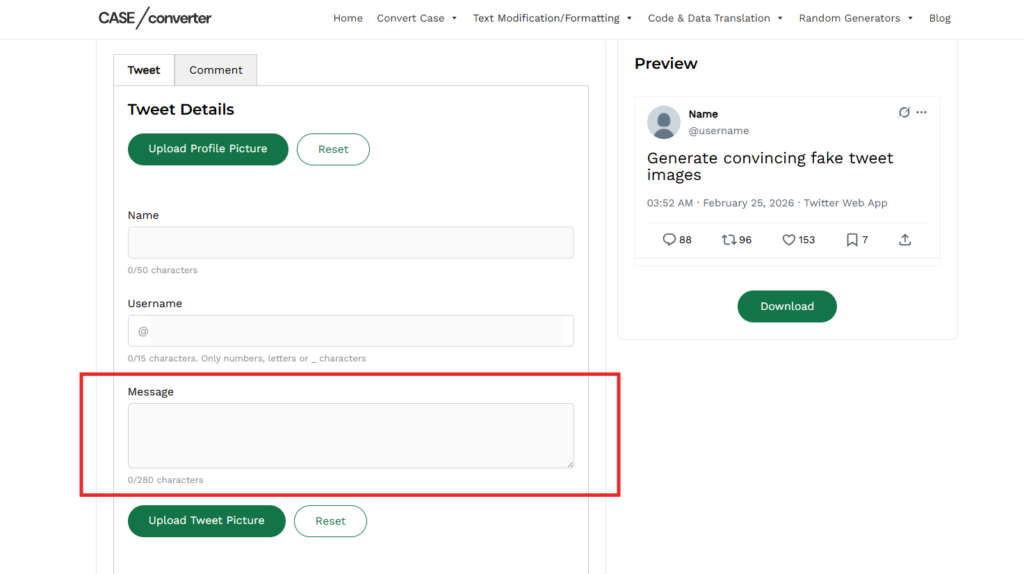
0/280 characters

hh:mm format
mmm dd, yyyy format
Twitter for iPhone, Twitter for Android, Twitter Web App, etc.

Theme

Verified Badge

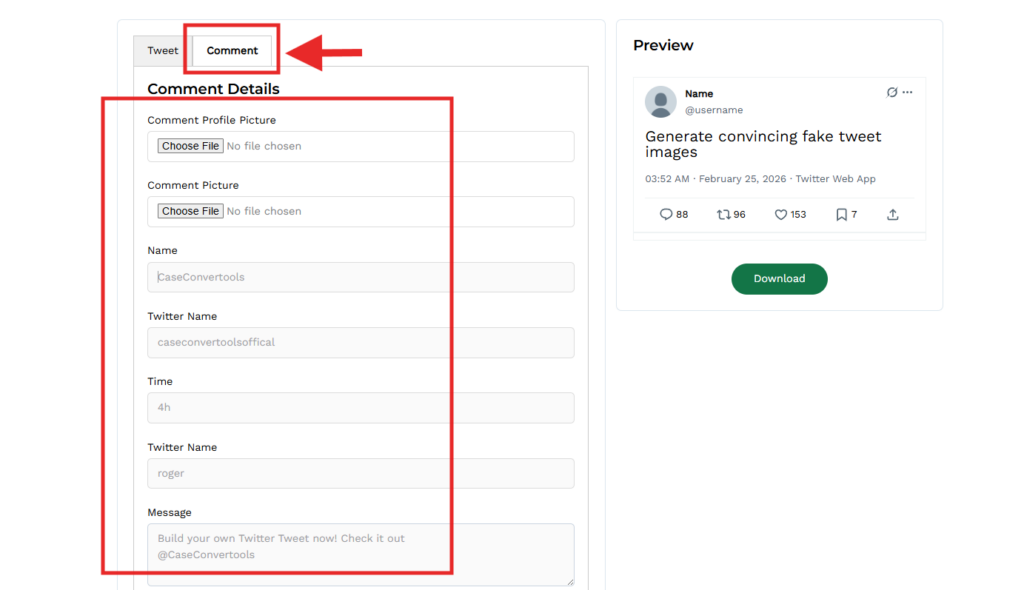
Comment Details

Preview

avatar
Name
@username
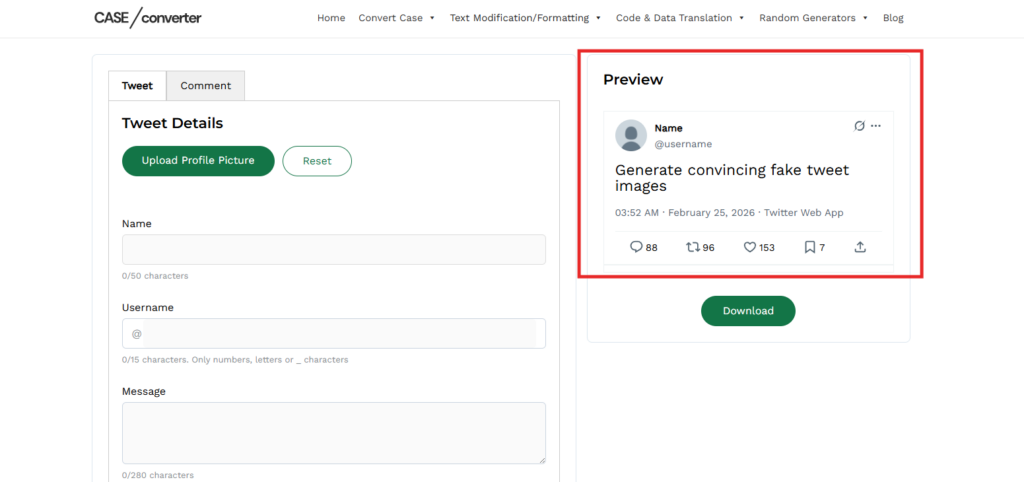
Generate convincing fake tweet images
avatar
6:50 PM
 · 
May 29, 2025
 · 
Twitter Web App
88 96 153 7
Was this helpful?
We're sorry. 🙁
Email Address * We ask for your email so we can let you know once the issue is fixed. No spam, promise!

Our fake tweet generator lets you create realistic Twitter posts and fake X posts in seconds. Add a display name, @username, profile photo, and custom tweet text, then adjust likes, retweets, replies, and timestamps to match the real interface.

With this powerful fake tweet maker, you have full control over engagement stats, themes (Light, Dim, or Dark), and tweet source styling. Whether you need a twitter post generator for memes or a tweet simulator for mockups, everything updates instantly in your browser.

This tool isn’t just for jokes. Marketers, content creators, designers, and social media managers use our fake tweet creator to test ideas, build visuals, and create shareable content that looks authentic.

There’s no signup, no installation, and no watermark. Just open the fake twitter post generator, customize your layout, preview in real time, and download a high-quality PNG.

We’ve designed this create fake tweets process to be fast, clean, and beginner-friendly, so anyone can generate a realistic fake twitter template in just a few clicks.

Key Features of Our Fake Tweet Creator Tool

Our fake tweet creator is designed to generate realistic Twitter posts and fake X posts with full customization. Below are the core features that make this one of the most flexible fake tweet generators available online.

  1. Full Tweet Customization: Add name, @username, profile photo, tweet text, and toggle the verified badge.
  2. Engagement Control: Set likes, retweets, replies, quotes, and bookmarks. Great for creating a fake tweet with replies or using it as a tweet simulator.
  3. Image Support: Create a fake tweet with image and download it as a high-quality PNG.
  4. Theme & Source Options: Choose Light, Dim, or Dark mode and select tweet source (Web or iPhone). Works as a modern fake X post generator.
  5. Reply & Comment Generator: Add fake replies with custom stats to simulate conversations or a fake twitter thread.
  6. No Login, No Watermark: Our fake twitter post generator runs in your browser, no signup, no branding on downloads.

How to Make a Fake Tweet (Step-by-Step Guide)

Creating a realistic fake tweet or fake X post takes less than a minute. Follow these simple steps using our fake tweet generator:

Step 1: Enter Your Tweet Text

Step 1 Enter Your Tweet Text

Start by typing your message into the main input box.

  • Add plain text, emojis, or hashtags
  • Keep it short or write a longer post
  • Format it naturally like a real Twitter post

This forms the core content of your fake tweet maker layout.

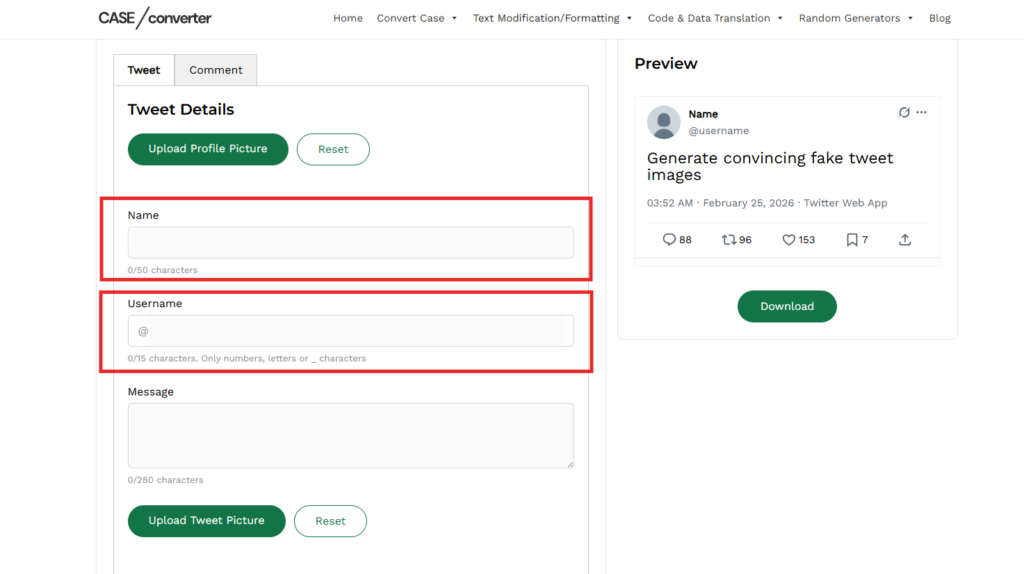
Step 2: Add Name and Username

Step 2 Add Name and Username

Enter:

  • Display name
  • @username (handle)

These details help your fake twitter post look authentic. Make sure the handle matches the tone or theme of your content.

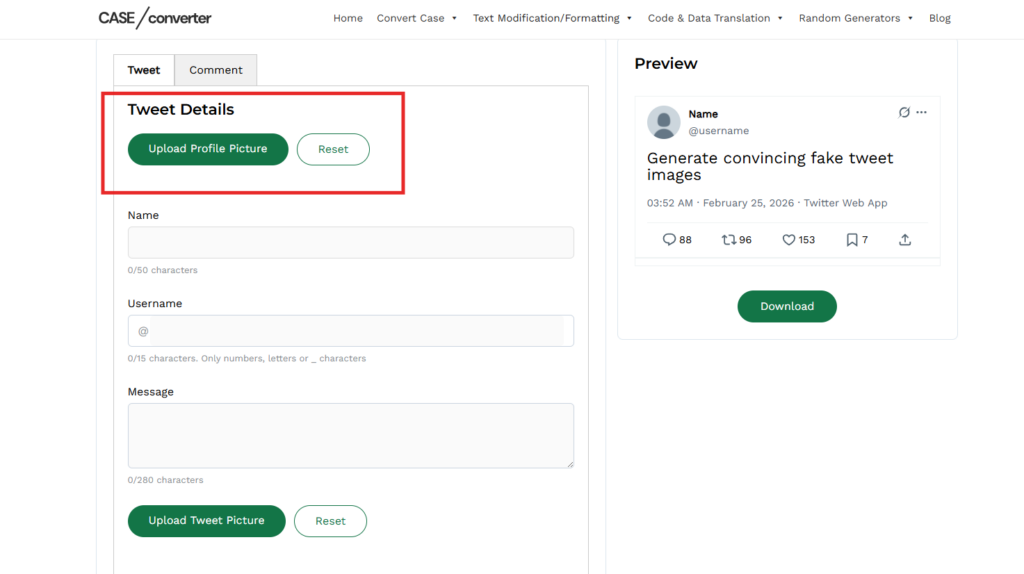
Step 3: Upload a Profile Photo

Step 3 Upload a Profile Photo

Click the upload option to add a profile image.

  • Works with common image formats
  • Automatically resizes to fit the layout
  • Appears exactly like a real Twitter profile image

This makes your fake tweet template more realistic.

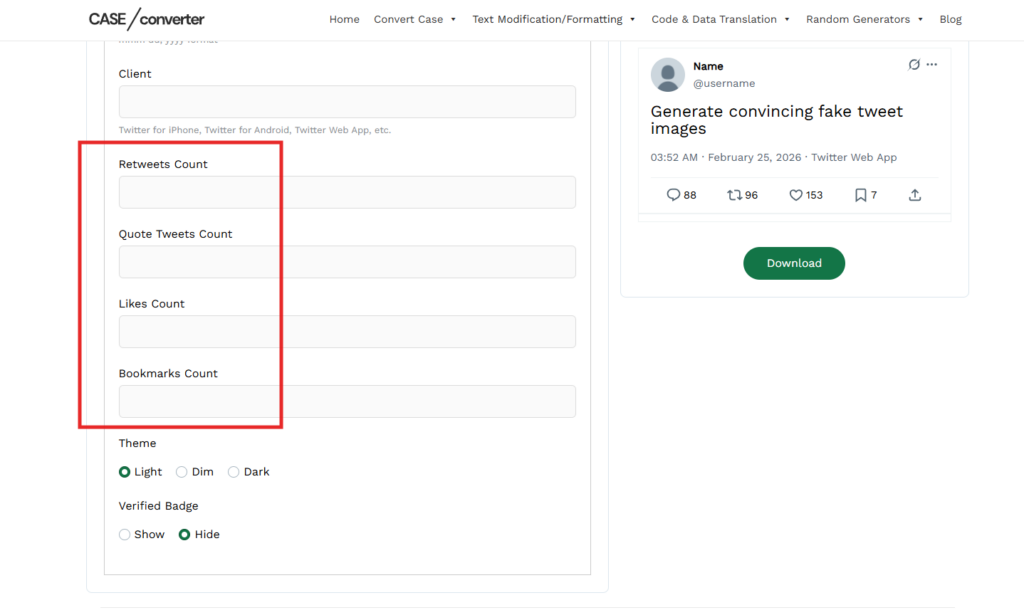
Step 4: Customize Engagement Stats

Step 4 Customize Engagement Stats

Adjust the numbers to simulate interaction:

  • Likes
  • Retweets
  • Replies
  • Quote tweets
  • Bookmarks

Use this feature to create a fake tweet with replies or simulate viral engagement with our tweet simulator.

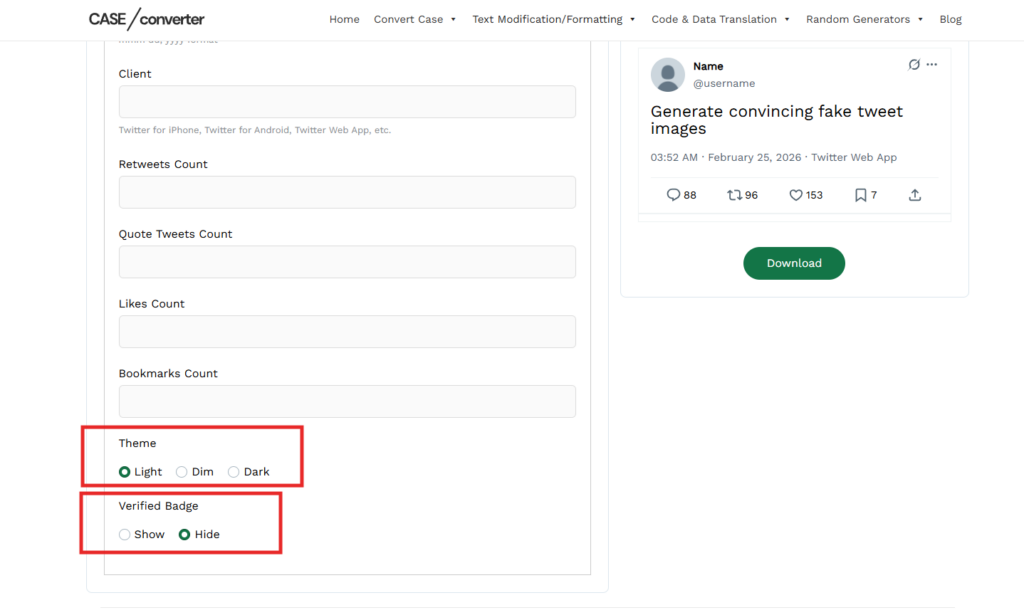
Step 5: Choose Theme & Tweet Source

Step 5 Choose Theme & Tweet Source

Match the current platform style by selecting:

  • Light mode
  • Dim mode
  • Dark mode
  • Tweet source (Web App or iPhone)

This allows you to generate a modern fake X post or classic Twitter layout.

Step 6: Preview in Real Time

Step 6 Preview in Real Time

As you update fields, the preview adjusts instantly.

This live preview helps you:

  • Check formatting
  • Adjust spacing
  • Fine-tune engagement numbers
  • Ensure your twitter post generator output looks clean

No refreshing required.

Step 7: Download Your Fake Tweet

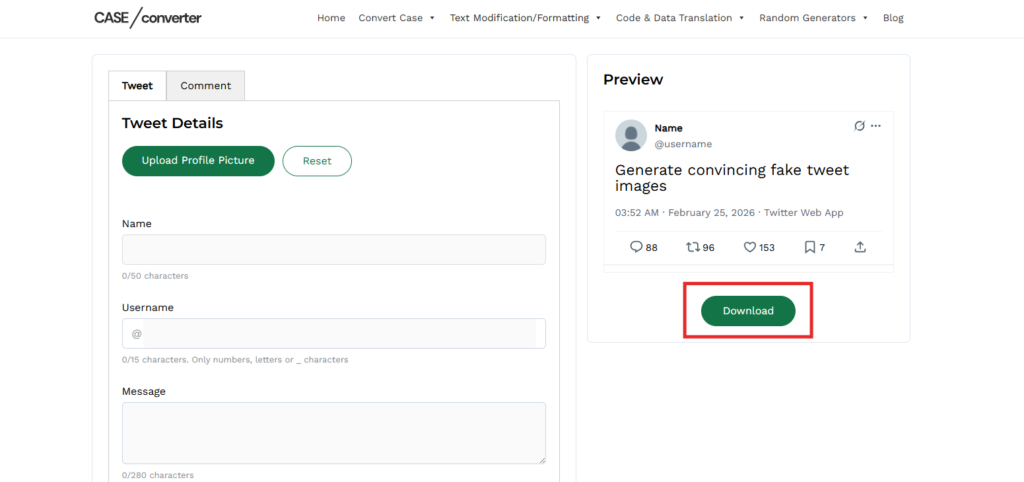
Step 7 Download Your Fake Tweet

Once everything looks right:

  • Click the Download button
  • Save the high-quality PNG image
  • Share it anywhere

Your fake tweet generator online export is watermark-free and ready to use.

Create Fake Twitter Replies & Conversations

Create Fake Twitter Replies & Conversations

A single post looks good. A conversation looks real.

With our fake tweet generator, you can add replies under your main tweet to simulate authentic interaction. Each reply includes its own name, username, profile image, and engagement stats,  just like a real Twitter (X) thread.

Example Conversation Layout

@TechDaily
“AI tools are replacing 40% of repetitive office tasks by 2026.”

💬 1.2K Replies 🔁 3.4K Retweets ❤️ 8.9K Likes

Reply from @StartupGuy
“Not replacing — enhancing. Teams that adapt will win.”

❤️ 742 Likes

Reply from @DesignLead
“This is why upskilling matters more than ever.”

❤️ 389 Likes 

This example shows how you can create a fake tweet with replies that feels natural and believable. You can control every detail, from engagement numbers to profile identities, making it useful as a tweet simulator, meme template, or content mockup tool.

Everything updates in real time and downloads as a watermark-free PNG.

Why Use This Tool?

There are many reasons people create tweet-style posts, but speed and simplicity matter most. This tool removes friction and lets you build realistic layouts in seconds.

  • For Meme Creators: Design humorous or parody-style posts without needing graphic software. Adjust text, stats, and themes to match trending formats.
  • For Social Media Managers: Preview how announcements, campaigns, or engagement-focused posts might look before publishing.
  • For Designers & Developers: Create UI mockups or presentation visuals that replicate the Twitter/X interface accurately.
  • For Video Editors & Content Creators: Generate overlay graphics for YouTube videos, tutorials, commentary, or storytelling content.
  • For Testing & Experimentation: Experiment with post structure, formatting, and engagement numbers to see what works best visually.

Frequently Asked Questions

Can I create a tweet with replies?

Yes. You can add one or multiple replies under the main post and customize the name, profile image, and engagement numbers for each response.

Yes. You can upload a photo and it will automatically adjust to match the platform’s layout before downloading.

Yes. The tool works on most modern mobile browsers. You can create and download images directly from your phone or tablet.

All posts are exported as high-quality PNG images, ready to share or use in videos and presentations.

No. Your inputs and uploaded images are not saved. Once you close the page, everything is cleared.

Scroll to Top