
Campaign URL Builder
Use our free UTM builder to create trackable campaign URLs in seconds. Whether you’re managing ads, emails, or social media posts, our Campaign URL Builder makes it easy to generate clean links with built-in UTM tracking.
No coding needed, just enter your details and get a link that works perfectly with Google Analytics. Our UTM generator is simple, fast, and built to help you track what matters most.
Please enter a complete and valid website URL (e.g. https://caseconverter.tools).
Campaign Source is required and cannot be left empty.
Campaign Medium is required and cannot be left empty.
Campaign Name is required and cannot be left empty.
Generated campaign URL
Our Campaign URL Builder makes link tracking simple. Whether you’re running ads, sending emails, or posting on social media, this free tool helps you create clean, trackable links in seconds.
With our UTM builder, you don’t have to worry about messy URLs or confusing formats.
Just enter your website, add your campaign details, and click generate. That’s it. Our tool works as a fast UTM generator, perfect for marketers, bloggers, or anyone who wants to use Google UTM links without any hassle.
No logins. No setup. Just a free and easy way to build campaign URLs that work with Google Analytics.
What is a UTM Code?
A UTM code is a simple tag you add to the end of a URL. It tells tools like Google Analytics where your traffic is coming from.
For example, if someone clicks a link in your email, the UTM code helps you see that the visit came from your email campaign, not from search or social media.
A full UTM link might look like this: https://yourwebsite.com/?utm_source=newsletter&utm_medium=email&utm_campaign=spring_sale
This code breaks down into five parts:
- utm_source – Where the click came from (like google, facebook, or newsletter)
- utm_medium – How the link was shared (like email, cpc, or banner)
- utm_campaign – The name of your campaign (like spring_sale or product_launch)
- utm_term (optional) – Tracks specific keywords (great for paid search)
- utm_content (optional) – Helps compare ads or links (like button_red vs button_blue)
With UTM tracking, you’ll know exactly what’s working and what’s not in your marketing. Our UTM code generator makes it super easy to build these links without any guesswork.
Why You Need a UTM Builder Tool
If you’re still creating tracking links by hand, you’re probably wasting time, and risking mistakes. Typing out parameters manually can lead to broken URLs, missing data, or tracking errors in your analytics.
That’s where a UTM generator tool comes in.
Our tool takes care of the formatting for you. Just fill in your campaign info, and it builds the full link instantly. No need to remember the correct order or worry about typos.
This is especially useful for:
- Tracking ad performance on platforms like Facebook, LinkedIn, or Google Ads
- Monitoring email traffic from different newsletters or sequences
- Comparing traffic from blog links, buttons, or banners
Instead of guessing where your visitors are coming from, you’ll get clean, organized data in your analytics dashboard.
Whether you’re working solo or part of a marketing team, using a link builder like this helps you stay consistent, and saves time every day
How Our Campaign URL Builder Tool Works
Using our Campaign URL Builder is fast, easy, and requires no technical skills. Here’s a simple step-by-step guide to help you get started:
Step 1: Enter Your Website URL

Start by typing in your website’s full address. Make sure to include https:// or http:// at the beginning, this is important. If the format isn’t correct, the tool will show a helpful error so you can fix it right away.
Example: https://yourwebsite.com
Step 2: Add Your Campaign Source

This tells you where the traffic is coming from. It could be:
- A platform like google, facebook, or twitter
- A newsletter name like weekly_update
- Any source that sends users to your link
Step 3: Choose the Medium
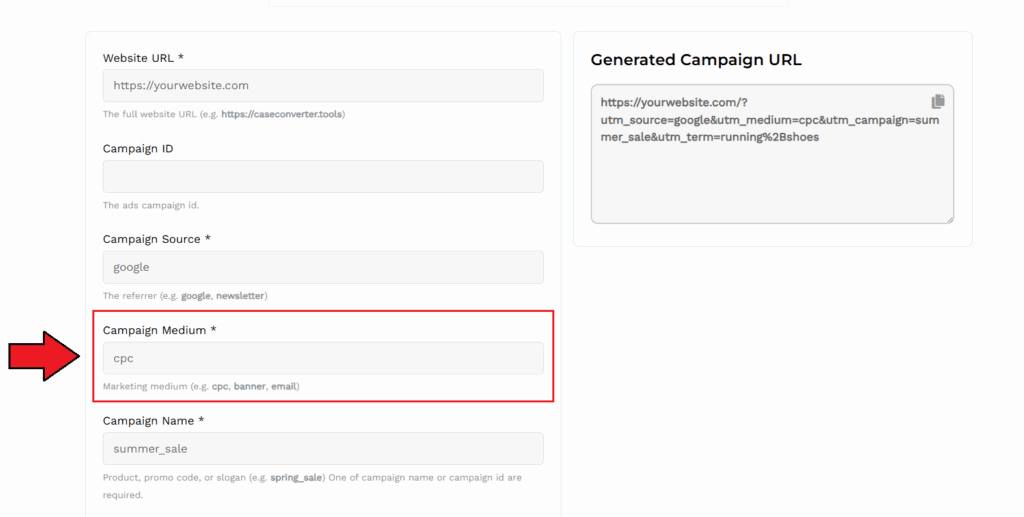
Next, pick the type of channel you’re using to promote the link. This could be:
- email for newsletters
- cpc for paid ads
- banner for display promotions
- Or even referral for affiliate links
This helps you separate how traffic arrives, not just where it comes from.
Step 4: Name Your Campaign
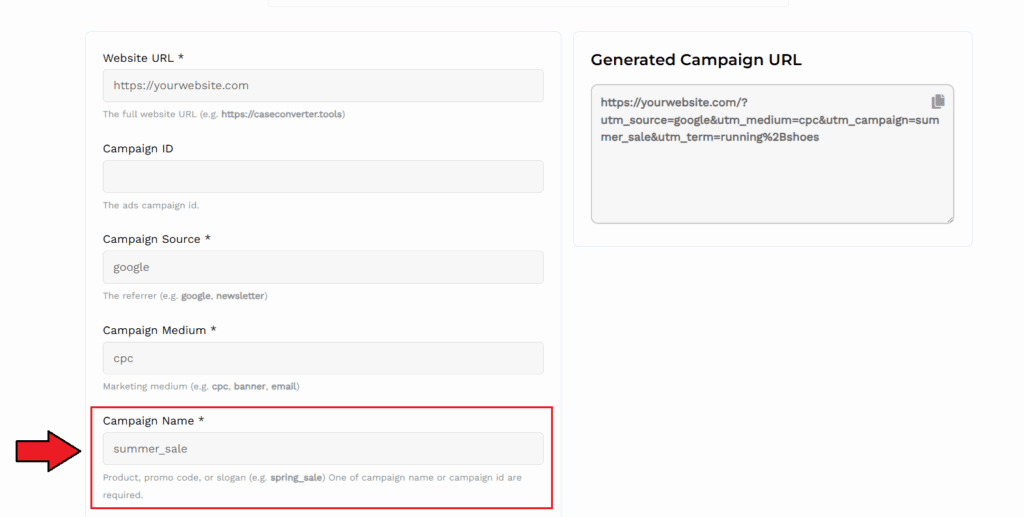
Give your campaign a clear and meaningful name. It could be a product launch, a seasonal promo, or a code name you use for your ad set.
Example: summer_sale, launch_2025, affiliate_offer
This makes it easier to spot your results in analytics later.
Step 5: (Optional) Add Keywords and Ad Variations
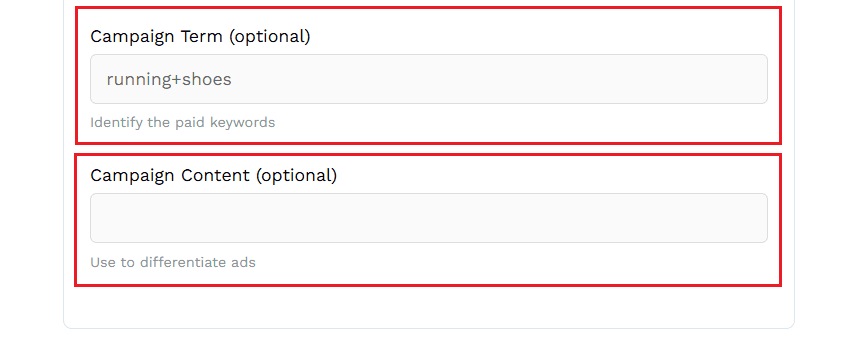
You can also fill in:
- Campaign Term – Great for paid search. Add specific keywords you’re targeting (e.g., running+shoes)
- Campaign Content – Use this to test different versions of a link (like a green button vs. red button)
These fields are optional, but they help you drill down into campaign performance.
Step 6: Copy Your Final URL
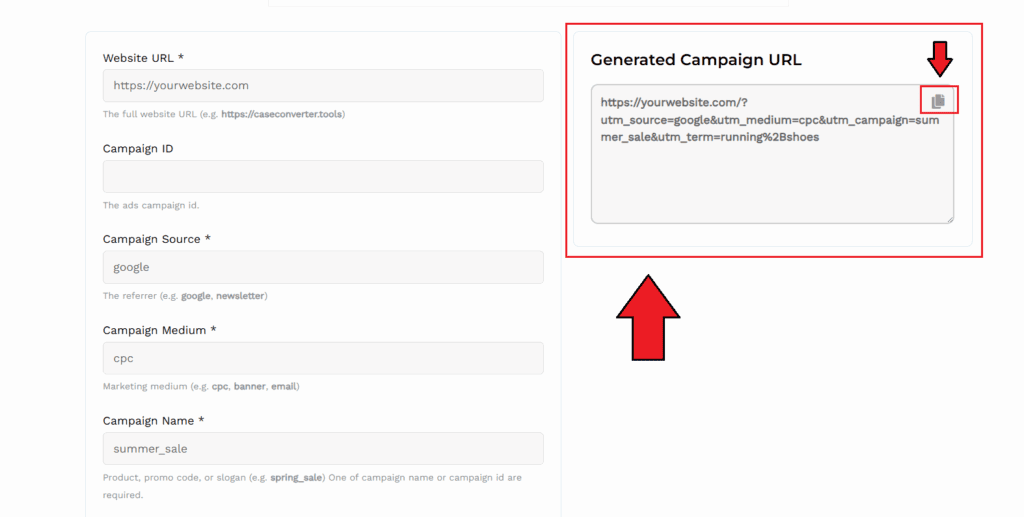
Once everything’s filled in, the tool instantly builds your full campaign URL. Just copy and paste it into your ad, email, or post. That’s it!
Your final link is clean, trackable, and ready to work with tools like Google Analytics or other tracking systems.
No coding. No spreadsheets. Just quick and accurate UTM link creation, every time.
Use Cases: Who Should Use This Tool?
Our Campaign URL Builder isn’t just for marketers, it’s for anyone who wants better insight into their traffic. Whether you’re promoting content, running ads, or sharing links, this tool helps you stay in control of your data.
Here’s who benefits the most:
- Email Marketers – Tag newsletters and automation emails to see which ones drive traffic.
- Social Media Managers – Track clicks from different platforms like Facebook, Instagram, or LinkedIn.
- Paid Ad Specialists – Use custom links for each ad set to measure performance across campaigns.
- Bloggers & Creators – Know exactly where your readers or viewers are coming from.
- Affiliate Marketers – Give unique UTM links to partners and track every click.
- Small Teams & Startups – No setup needed. Just build, share, and track.
Whether you’re a beginner or a pro, this UTM link builder helps you measure your efforts with precision.
How to Track Campaign URLs in Google Analytics
Once you’ve created your campaign link using our UTM builder, tracking performance is simple with Google Analytics.
Here’s how to do it:
Step 1: Share Your UTM Link
Use the campaign URL anywhere, in ads, emails, social posts, or affiliate content. Every time someone clicks the link, the tracking info is recorded.
Step 2: Open Google Analytics (GA4)
Go to your GA4 property. Click on:
Reports > Acquisition > Traffic Acquisition
This section shows where your visitors come from. You’ll see data like:
- Source (e.g., google, facebook, newsletter)
- Medium (e.g., email, cpc, referral)
- Campaign (the name you added)
Step 3: Analyze the Data
Now you can compare which campaigns bring in the most traffic, time on site, or conversions. Use this info to improve future campaigns.
Tip: Use consistent naming for campaigns so they’re easy to read in reports.
Using a tool like ours makes it easy to connect the dots between your links and real results, no coding or setup required. It’s a simple way to power up your Google Analytics tracking.
Why Our UTM Generator is the Best
There are plenty of UTM tools out there, but most are either too complex, require sign-up, or limit how you use them. Our tool is different. It’s built for speed, simplicity, and accuracy.
Here’s why users love it:
- 100% Free, Always: No pricing tiers. No trials. Our UTM builder is completely free to use, as many times as you want.
- No Guesswork: We handle the formatting, structure, and validation. You just enter the details and get a perfectly tagged link every time.
- No Login or Setup: Start using it right away. No sign-up. No software to install. Just go to the page and build your campaign URL.
- Clean, User-Friendly Design: The tool is lightweight and easy to use, even if it’s your first time working with tracking links. It works across all modern browsers.
- Google Analytics-Ready: Every link created is fully compatible with Google Analytics and other major tracking platforms. No need to change anything later.
If you’re looking for a fast, reliable, and beginner-friendly UTM generator, ours is built to help you get more from every campaign, without the hassle.
FAQs
What is a UTM link?
A UTM link is a normal URL with extra tracking information added to it. These tags help you see where your website traffic is coming from, like an email, ad, or social media post, inside Google Analytics.
Is your UTM builder free to use?
Yes! Our Campaign URL Builder is 100% free. You can create as many UTM links as you want, no sign-up, no limits, no hidden fees.
Do I need a Google Analytics account to use this tool?
You don’t need an account to create UTM links, but to track your results, you should have Google Analytics set up on your website.
What happens if I leave some fields blank?
Only the source, medium, and campaign fields are required. The other fields, like term and content, are optional and used for more detailed tracking if you need it.
Will the tool work with any website?
Yes! You can create campaign URLs for any website, as long as you enter a full and valid URL (including https:// or http://).